
Reporting per purchase
Creating the Per purchase report
Introduction: What is the Per purchase report?
The Per purchase report is an Excel file with an overview of everything you have purchased in a specific period. You see exactly which products you bought from which suppliers, how many pieces, and at what prices. You can filter and sort this report in Excel to make analyses.
Why use the Per purchase report?
You want to use this report because:
- You get a complete overview of all your purchases in a period
- You can analyse what you buy most
- You can compare prices from different suppliers
- You can see which products have not yet been sold (quantity remaining)
- You can export it to Excel for further processing
- You can keep historical purchase data for your administration
Important warning: As soon as you create a report, it may already be outdated! Colleagues may have changed things in Easyflor in the meantime. Therefore, mainly use reports for retrospective analysis, not for daily work. For up-to-date information, work directly in Easyflor.
How do you create a Per purchase report?
Step 1: Go to the reports menu
Open reports
- Go to "Reports"
- Click on "(Purchases) Per purchase"
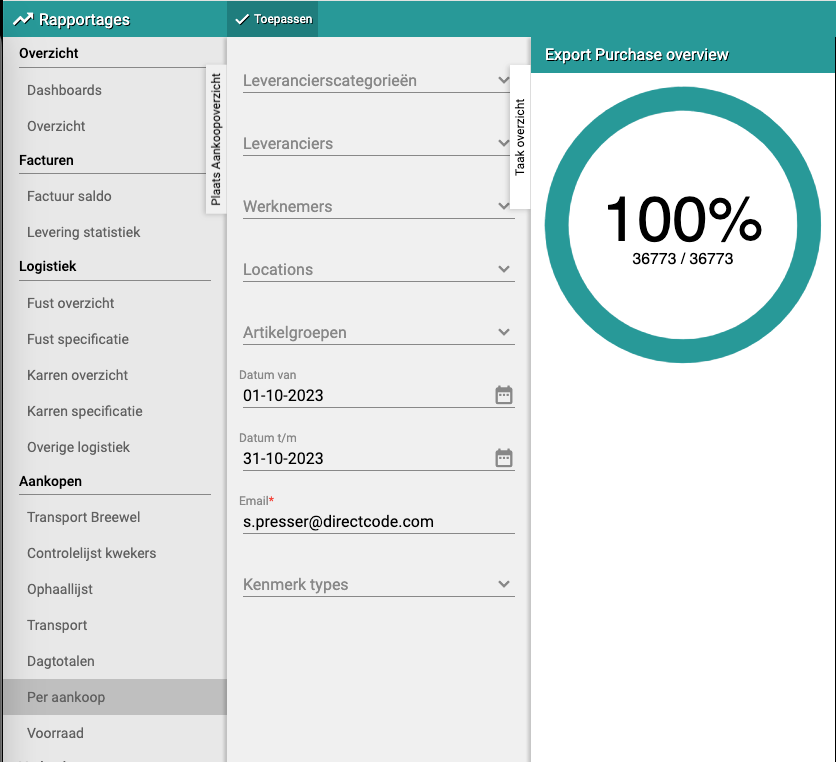
- You now see a screen with settings for the report
Step 2: Set filters
Warning: This can become a very large report!
- The more data you request, the larger the file
- Large files take a long time to create and are slow in Excel
- It is smarter to use filters to keep the report smaller
Advice per company size:
- Companies with 2+ employees: Create reports per month (no longer than 1 month)
- First time making a report: Start small, try 1 week or even 1 day
- Later: Once you know how large your reports become, you can try longer periods
Setting filters
Required:
- Email address: Fill in your own email address
- The report will be emailed to this address
- You receive a link to download the Excel file
Optional (to make the report smaller):
- Date from: From which date do you want to see purchases? (for example 1 December 2025)
- Date to: Until which date do you want to see purchases? (for example 31 December 2025)
- Supplier: Only purchases from a specific supplier
- Article group: Only purchases from a specific product group (for example only roses)
- VBN code: Only purchases with a specific VBN code
- Other filters: Depending on your system there are more filter options
Example filter settings:
- Date from: 1 December 2025
- Date to: 31 December 2025
- Email address: jan@company.com
- Rest: leave empty (all suppliers and products)
Step 3: Create report
Start report
- Check whether all settings are correct
- Click on "Apply"
- The system now starts creating the report
- This can take a while, especially for large periods
What happens now?
- The system collects all purchase data from the chosen period
- This is converted into an Excel file
- You receive an email with a download link
- This can take from a few minutes to an hour, depending on the amount of data
Receive email
- Check your email inbox
- Look for an email from Easyflor with the report
- Click on the download link in the email
- The Excel file is downloaded to your computer
Step 4: View and use the report
Open Excel
- Open the downloaded Excel file
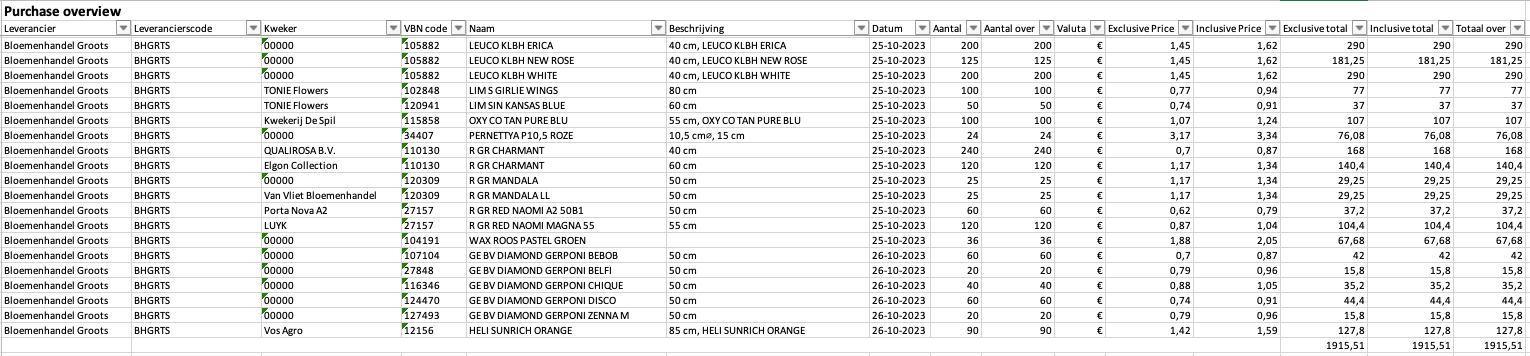
- You now see a large overview with many rows and columns
- Each row is one purchase
Columns in the report:
The report contains the following information (from left to right):
- Supplier: The name of the supplier (for example "Nursery Jansen")
- Supplier code: The supplier code in your system
- Grower: The name of the grower (if different from the supplier)
- VBN code: The VBN number of the product
- Name: The name of the product (for example "Rose red 60cm")
- Description: Additional description of the product
- Date: The date on which you purchased the product
- Quantity: How many pieces you purchased
- Quantity remaining: How many pieces have not yet been sold
- Currency: The currency (usually euro)
- Exclusive Price: Price per piece without VAT
- Inclusive Price: Price per piece with VAT
- Exclusive total: Total price without VAT (quantity × price excl.)
- Inclusive total: Total price with VAT (quantity × price incl.)
- Total remaining: Value of the products that have not yet been sold
Filtering in Excel
- Click on the small triangles in the header row (top of each column)
- You can now filter on each column
- Examples:
- Filter on "Supplier" to see only purchases from one supplier
- Filter on "Name" to see only roses
- Filter on "Date" to see only a specific week
Sorting in Excel
- Click on a column header
- Click on "Sort A to Z" or "Sort Z to A"
- Examples:
- Sort on "Inclusive total" to see what your most expensive purchases were
- Sort on "Quantity remaining" to see which products have not yet been sold
- Sort on "Supplier" to group per supplier
Practical examples
Example 1: Monthly report for administration
- Situation: Your accountant wants an overview of all purchases in December
- Action:
- Date from: 1 December 2025
- Date to: 31 December 2025
- Fill in your email address
- Click on Apply
- Result: Excel with all December purchases, clearly organised per supplier
Example 2: Analysis of one supplier
- Situation: You want to know how much you have bought from Nursery Jansen
- Action:
- Date from: 1 January 2025
- Date to: 31 December 2025
- Supplier: Nursery Jansen
- Fill in your email address
- Result: Overview of only purchases from Nursery Jansen in 2025
Example 3: Stock check
- Situation: You want to see which products have not yet been sold
- Action:
- Make a report of the past month
- Open Excel and sort on "Quantity remaining"
- Filter only rows where "Quantity remaining" is greater than 0
- Result: List of products still in stock
Example 4: Weekly overview
- Situation: You want to check every week what you have purchased
- Action:
- Date from: Monday of this week
- Date to: Sunday of this week
- Create the report
- Result: Small, clear report of one week
Important tips
Tip 1: Start small
- First make a report of 1 day or 1 week
- Check how large it becomes and how long it takes
- Then expand to longer periods
Tip 2: Use filters
- Don't request everything at once
- Filter on supplier, date or product group
- This makes reports smaller and faster
Tip 3: Save reports with a clear name
- For example: "Purchase_December_2025.xlsx"
- Or: "Purchase_Jansen_2025.xlsx"
- This way you can find reports later
Tip 4: Make reports regularly
- For example every month
- This way you build up an archive
- Useful for annual overviews and analyses
Tip 5: Use Excel well
- Learn filters and sorting in Excel
- Use pivot tables for overviews
- This makes reporting much more useful
Tip 6: Reporting is a snapshot
- Data may be outdated as soon as you have the report
- Use it for retrospective analyses, not for current work
- For up-to-date info: work in Easyflor itself
Frequently asked questions
Question: How long does it take to create a report?
- 1 week of data: 1-5 minutes
- 1 month of data: 5-15 minutes
- 3 months of data: 15-60 minutes
- This depends on how many purchases you have made
Question: Why don't I receive an email?
- Check your spam/junk folder
- Check that your email address is filled in correctly
- Wait 10-15 minutes, large reports take longer
- If it doesn't work, try a smaller period
Question: The Excel file is too large to open
- You requested too much data
- Create a new report with filters
- Limit the date to 1 month or less
- Or filter on one supplier or product group
Question: Can I have this report created automatically every day?
- No, you have to request it manually
- You can create the same report every day
- But note: for daily work Easyflor is better than reports
Question: Are the numbers always correct?
- At the moment of creation yes
- But colleagues can change things afterwards
- That's why a report is a snapshot
- For up-to-date figures: check in Easyflor itself
What can you do with this report?
Make analyses:
- Which supplier is the cheapest?
- Which products do you buy the most?
- How much money do you spend per month?
- Which products are not selling? (high "Quantity remaining")
Administration:
- Overview for the bookkeeping
- Checking invoices from suppliers
- Proof of purchases for tax purposes
Planning:
- See patterns in your purchases
- Plan better purchasing for next month
- Identify slow-selling products
Negotiation:
- Compare prices from different suppliers
- See how much you buy from each supplier
- Use this for better price negotiations
Summary
You create the Per purchase report to get an Excel overview of all your purchases:
- Go to Reports → (Purchases) Per purchase
- Set filters to keep the report small: especially date (max 1 month), optionally supplier or product group
- Fill in your email address and click Apply
- You receive an email with the Excel file with 15 columns (supplier, product, date, quantities, prices, totals)
- Why useful: Make analyses, administration, planning, negotiation with suppliers
- Note: Reporting is a snapshot and may be outdated immediately, use Easyflor itself for up-to-date information
- Advice: Start with small periods (1 week), use filters, and create reports regularly (for example monthly)
Do you have questions or need help? Feel free to contact us by phone at +31 (0)71 30 20 310 or send an email to support@easyflor.nl.