
Checking in
Checking in products
Introduction: What is checking in?
Checking in means indicating in the system that you have received products. You do this for items you have ordered and that have now arrived at your location.
Why do you need to check in?
By checking in products, the system knows exactly what is in stock. This way you can:
- See which orders have already arrived
- Track what you still need to receive
- Prevent double ordering
- Sell products to customers that are actually in stock
How do you check in products?
Step 1: Go to the check-in screen
- Open the menu at the bottom right of your screen
- Click on "Check in"
Step 2: Choose your check-in method
You have two ways to check in products:
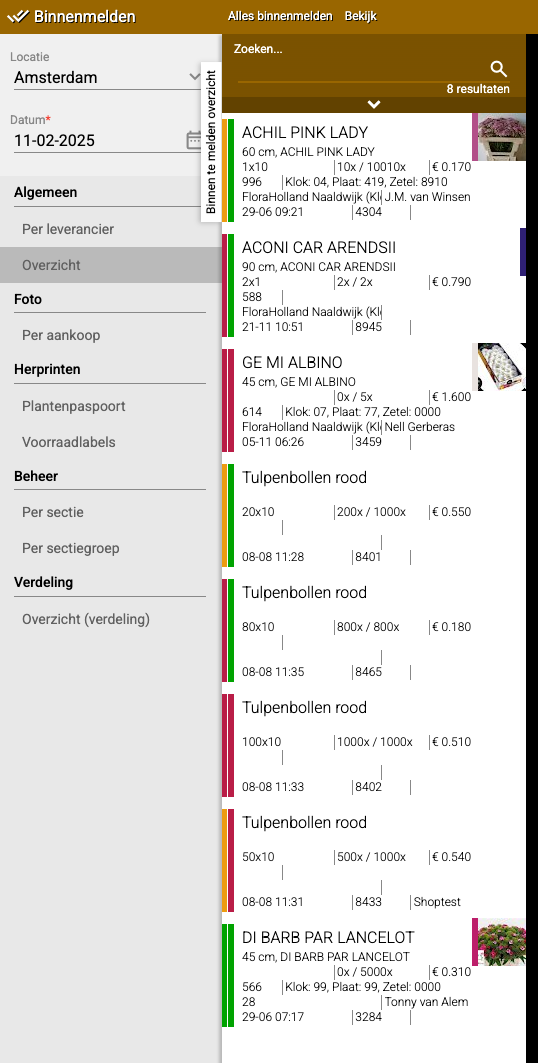
Option A: Overview (view everything at once)
- Click on "Overview"
- Here you see all items that still need to be checked in
- Checking in manually? Click on the item and then click "Check in" at the top
- Using a scanner? Scan the item and the label will be printed automatically
Pay attention to the colors:
- Red = Not yet checked in
- Orange = Partially checked in
- Green = Completely checked in
Option B: Per supplier (sorted by company)
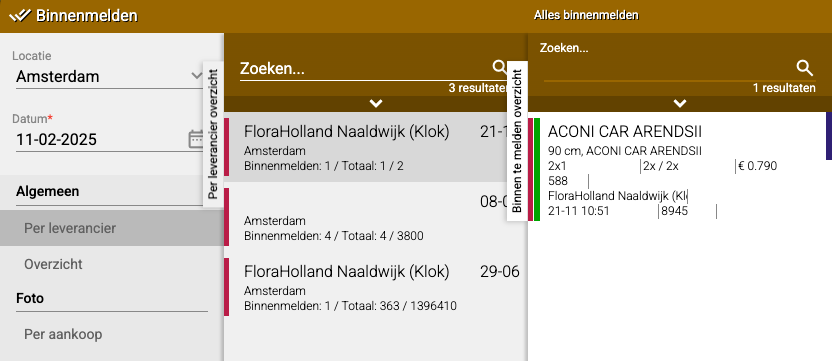
- Click on "(General) Per supplier"
- Did you receive everything from this supplier? Click "Check in all" at the top
- Didn't receive everything? Then click on the individual items you did receive
Step 3: Working with selections (optional)
Want to check in only certain items?
- Click on the menu below the search bar
- Check the items you want to check in
- Click again on "Select"
- Now only the selected items will be checked in

Extra tip: What's still coming?
The "Per supplier" overview is also useful to see which orders are still on their way to you.
Do you have questions or need help? Feel free to contact us by phone at +31 (0)71 30 20 310 or send an email to support@easyflor.nl.