
How does logistics distribution work?
Preparing orders: printing labels and reading status colours
Introduction: What is logistics distribution?
Logistics distribution (also called "order picking" or "redistribution") is the preparation of orders in the warehouse. You print labels or lists showing which products to grab for each customer, and then you go collect these products from stock.
Why use logistics distribution?
You use logistics distribution because:
- You know exactly which products to grab for each customer
- You don't forget orders or mix them up
- Employees have a clear list to work with
- You can walk efficiently through the warehouse to collect orders
- Labels or distribution lists ensure everything ends up in the right place
How do you use logistics distribution?
Step 1: Open and check logistics distribution
Go to the menu
- Open the menu at the bottom right
- Click on "Logistics distribution"
Important check (always do this first!)
- Check that the location is correct (for example: main location, north branch, etc.)
- Check that the date is correct (for example: today, tomorrow)
- If these are not correct, adjust them first
- This is very important! Otherwise you may print orders for the wrong day or location
Go to the overview
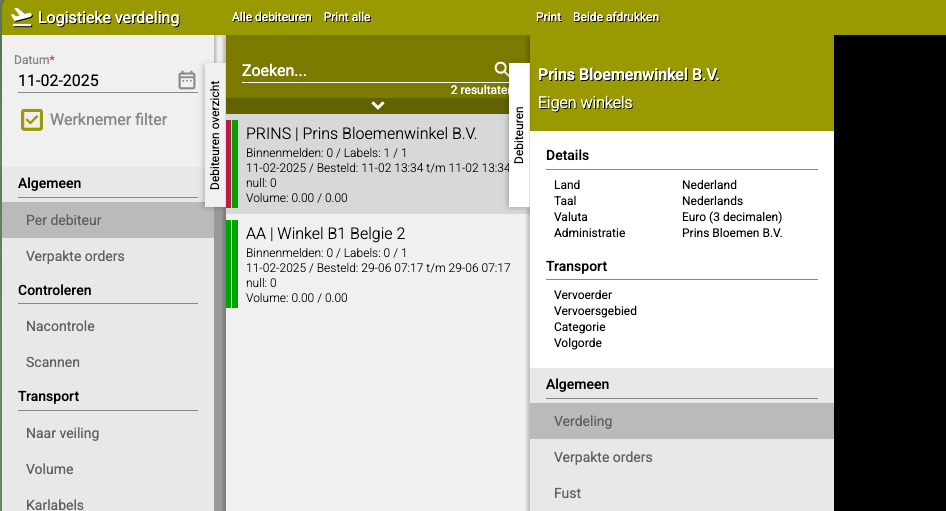
- Click on "(General) Per debtor"
- You now see a list of customers with orders that can be picked
Step 2: Understanding colours
For each customer you see two coloured bars. These tell you the status of the order.
Left bar: Order status
- Red: The order can be printed and is ready to execute
- Orange: The order is not yet complete. Some articles have not yet been received in stock
- Green: The order has already been printed and processed
Right bar: Order release
- Red: The order has not yet been released. The customer still has cancellation time and can still change or cancel the order
- Green: The order has been released and may be picked. The customer can no longer cancel
Which combinations are good for printing?
- Red + Green: Perfect! The order is complete AND released, ready to print
- Red + Red: Wait a bit, the customer can still cancel
- Orange + Green: Not all products are in, wait until everything is there
- Green + Green: This order has already been printed, no need to do it again
Step 3: Print labels or distribution lists
When an order is ready (left bar red or green, right bar green), you can print it.
Go to the customer
- Find the customer whose order you want to pick in the list
- Click on this customer
Print You now see two options (which one you see depends on how your system is configured):
Option A: Labels
- You see this option if you work with label printers
- Labels are small stickers that you stick on products
- Click on "Labels" to print the labels
Option B: Print
- You see this option if you work with distribution lists
- Distribution lists are A4 papers with all products on them
- Click on "Print" to print the list
What happens now?
- The labels or list are printed
- The left bar turns green (order is printed)
- Employees can now get to work collecting the products
Step 4: Collect products (after printing)
After printing, employees go pick the products from stock:
- Take the printed labels or list with you
- Walk through the warehouse
- Grab the products on the list
- Stick labels on the products (if you work with labels)
- Or collect everything together according to the list (if you work with distribution lists)
- Ready for shipping!
Practical examples
Example 1: Order ready to print
- Left bar: Red (order is complete)
- Right bar: Green (order is released)
- Action: Click on the customer and print the labels or list
- Result: Employee can go pick the order
Example 2: Order not yet released
- Left bar: Red (order is complete)
- Right bar: Red (customer can still cancel)
- Action: Wait until the cancellation time has passed
- Result: In a few hours the right bar will turn green and you can print
Example 3: Order not complete
- Left bar: Orange (some products missing)
- Right bar: Green (order is released)
- Action: Wait until all products have been checked in
- Result: As soon as everything is in, the left bar will turn red and you can print
Example 4: Order already printed
- Left bar: Green (order has already been processed)
- Right bar: Green (order was released)
- Action: Do nothing, this one is already done
- Result: The order is already being picked or has already been shipped
Important tips
Tip 1: Always check location and date first
- This prevents printing orders for the wrong day or location
- Check this every time you start with logistics distribution
- Better to check too often than to forget once!
Tip 2: Watch the colours
- Red left bar + green right bar = GO!
- Anything else = wait or solve problems first
- This saves errors and prevents double work
Tip 3: Print orders in order of priority
- Rush orders first
- Regular orders after that
- Orders for later in the day last
Tip 4: Work systematically
- For example, print all orders for one route at the same time
- Or print all orders for one carrier together
- This makes the work more efficient
Tip 5: Communicate with colleagues
- Has someone already printed something? Check the green bars
- Are there orange bars? Ask when the products are coming in
- Teamwork makes the work faster and better
Frequently asked questions
Question: What if the right bar stays red?
- Then the cancellation time has not yet passed
- The customer can still make changes
- Wait until the bar turns green before printing
Question: Can I still print an order if the left bar is orange?
- Technically yes, but not recommended
- You'll then miss products and can't make the order complete
- Better to wait until everything is in
Question: Why don't I see some customers in the list?
- They may not have any orders ready yet
- Or the orders have already been printed (green bars)
- Or the date/location is not set correctly
Question: What if I accidentally print twice?
- That's usually not a big problem
- You get duplicate labels or lists
- Just throw away the second set
Summary
You use logistics distribution to prepare orders for shipping:
- Open Logistics distribution and always first check location and date
- Go to (General) Per debtor to see orders
- Two coloured bars show the status: left = completeness (red=ready, orange=wait, green=printed), right = release (red=cancellation time, green=released)
- Click on a customer and choose Labels or Print to print the order
- Employees use the printed labels or lists to collect products
Do you have questions or need help? Feel free to contact us by phone at +31 (0)71 30 20 310 or send an email to support@easyflor.nl.