
Logistics distribution - Route
Creating routes for truck drivers
Introduction: What are routes?
Routes are pre-set driving routes for truck drivers. The system creates an overview with all addresses the driver needs to visit, in the correct order. This way the driver knows exactly where to go and in which order.
Why use routes?
You want to use routes because:
- Drivers know exactly which customers they need to visit
- They have a logical order so they don't drive unnecessary kilometres
- You save time by not having to plan routes from scratch each time
- Drivers can print an overview or have it on their phone
- You can see which customer is visited first or last
- The work becomes organised and professional
How do you create routes?
Part 1: Preliminary settings (one-time setup)
Before you can use routes, you first need to configure a few things in the system. You do this once, after that you can create routes every week.
Step 1: Create transport area categories
Transport area categories are large areas in which you drive, for example "North Holland" or "Randstad".
Go to the menu
- Go to "Admin"
- Click on "(Organization) Transport area categories"
- Click on "New"
Create a category
- Give the category a name (for example "North Holland" or "Amsterdam Region")
- Click on "Save"
Repeat this for all the large areas in which you drive.
Step 2: Create transport areas
Transport areas are smaller areas within a category, for example "Amsterdam North" or "Zaandam".
Go to the menu
- Go to "Admin"
- Click on "(Organization) Transport areas"
- Click on "New"
Create a transport area
- Name: Give the transport area a name (for example "Amsterdam North")
- Category: Select the category you created in step 1 (for example "North Holland")
- Country: Choose the country in which this area is located (usually Netherlands)
- Click on "Save"
Note: You can link multiple transport areas to one category. For example: "Amsterdam North", "Amsterdam South" and "Zaandam" can all three fall under the category "North Holland".
Repeat this for all areas in which you drive.
Step 3: Create carriers
A carrier is the company or department responsible for transport.
Go to the menu
- Go to "Admin"
- Click on "(Organization) Carriers"
- Click on "New"
Create a carrier
- Name: Fill in the name of the carrier (for example "Transport Ltd" or "Own transport")
- Code: Give a short code (for example "TV01")
- Country: Choose the country where the carrier drives
- Click on "Save"
Step 4: Add driver, route and vehicle
Now you fill in the details per carrier: who drives, with which vehicle, and which route.
Go to the carrier
- Click on the carrier you just created
- You now see three tabs: Driver, Route and Vehicle
A. Add a driver
- Click on the "Driver" tab
- Click on "New"
- Fill in at least the surname of the driver (for example "Jansen")
- Optional: also fill in first name, phone number and other details
- Click on "Save"
B. Add a route
- Click on the "Route" tab
- Click on "New"
- Fill in the name of the route (for example "Route North" or "Monday morning")
- Click on "Save"
C. Add a vehicle
- Click on the "Vehicle" tab
- Click on "New"
- Fill in the name of the vehicle (for example "Truck 1")
- Fill in the licence plate (for example "AB-123-CD")
- Click on "Save"
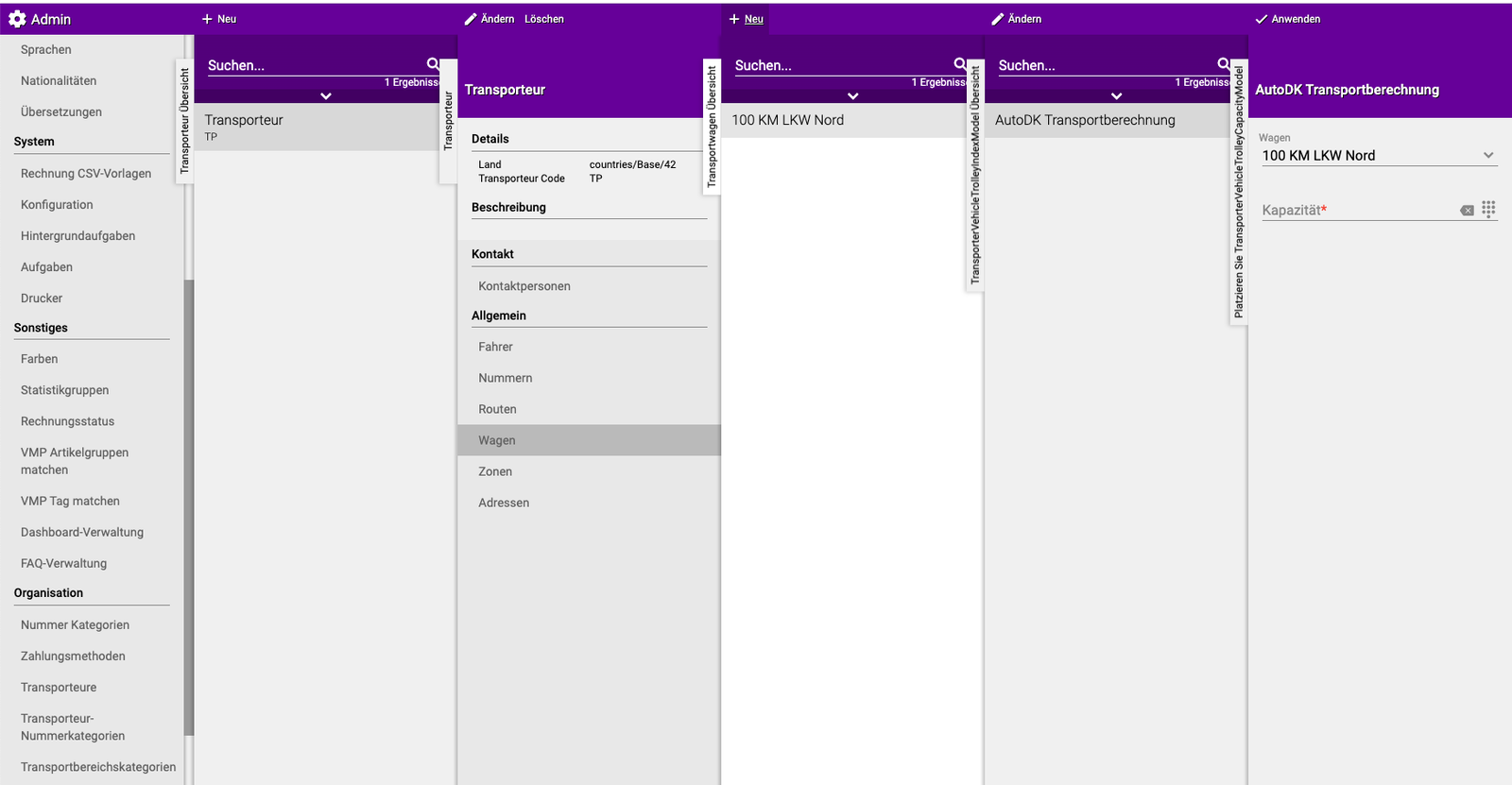

Repeat this for all drivers, routes and vehicles you have.
Step 5: Set route per delivery day (optional but useful)
If a driver drives the same route on the same day every week, you can have this created automatically.
Example: Jan drives "Route North" every Monday and "Route South" every Friday.
How do you set this up?
- Go to "Organization"
- Click on "(General) Debtors"
- Select a customer
- Click on "(General) Configuration"
- Click on "(Logistics) Transport"
- Click on "(General) Carrier per day"
- Here you can set per day of the week which route this customer gets
Advantage: The system now automatically creates the same routes every week. You don't have to do this manually anymore!
Part 2: Using routes (every week)
Now that the settings are ready, you can start using routes for your drivers.
Situation A: Route per delivery day is set (automatic)
If you set up routes per delivery day in Part 1, Step 5, routes are created automatically.
What still needs to be done? Sometimes you want to adjust the order of stops. For example: customer A needs to be visited first today instead of third.
Adjusting the order:
- Go to "Logistics distribution"
- Click on "(Transport) Route"
- Select the route you want to adjust
- Click on "Prioritise"
- You now see a list of all customers on this route
- Drag the customers to the desired order (or use arrows to move them)
- Click on "Save"
Done! The route is now in the correct order.
Situation B: No route per delivery day set (manual)
If you have not set up routes automatically, you have to create them manually each time.
Create a route manually:
- Go to "Logistics distribution"
- Click on "(Transport) Route"
- Click on "New"
- Fill in the following:
- Route: Choose the route to be driven (for example "Route North")
- Driver: Choose who drives (for example "Jan Jansen")
- Vehicle: Choose with which vehicle (for example "Truck 1")
- Click on "Apply"
The route is now created and ready to use.
Step 6: Create and send route overview
Now you create the overview that the driver takes with them.
Go to the overview
- Go to "Logistics distribution"
- Click on "(Transport) Overview"
Choose settings
- Driver: Choose the driver for whom you create an overview
- Date: Set the date correctly (usually today or tomorrow)
- Location (optional): Optionally choose the starting location of the driver
Send the overview You now have two options:
Option 1: Print
- Click on "Print"
- A paper overview is printed
- Give this to the driver
Option 2: E-mail
- Click on "E-mail"
- The overview is sent by e-mail to the driver
- The driver can view it on their phone
Done! The driver now has a complete overview of their route.
Practical examples
Example 1: Setting up for the first time
- Situation: You have 2 drivers who drive in North Holland
- Action:
- Create category "North Holland"
- Create areas "Amsterdam" and "Zaandam"
- Create carrier "Own transport"
- Add 2 drivers, 2 routes and 2 vehicles
- Result: System is ready to create routes
Example 2: Setting up fixed routes
- Situation: Jan drives the same route every Monday
- Action:
- Go to each customer on that route
- Set: Monday = Route North with Jan
- Result: Every Monday the correct route for Jan is automatically created
Example 3: Creating a daily route
- Situation: It's Monday morning, Jan is about to drive
- Action:
- Go to Transport → Overview
- Choose Jan as driver, date today
- Print the overview
- Result: Jan has a list of all addresses in the correct order
Example 4: Adjusting the order
- Situation: Customer Pietersen needs to be visited first today instead of third
- Action:
- Go to Transport → Route → Prioritise
- Drag Pietersen to position 1
- Result: Pietersen is now at the top of the route
Important tips
Tip 1: Start small
- Start with one driver and one route
- If that works well, then add more
- This way you learn the system step by step
Tip 2: Use logical names
- Route North, Route South (clear which area)
- Monday morning, Friday afternoon (clear when)
- Truck 1, Truck 2 (clear which vehicle)
Tip 3: Set up fixed routes
- If a driver drives the same route every week, set this up
- This saves you manual work each week
- The system then does it automatically
Tip 4: Check the order
- Always check whether the order is logical
- Adjust if a customer is in a hurry
- Or if a customer is closer to the start than expected
Tip 5: E-mail to drivers
- Give drivers access to their e-mail on the road
- This way they can always consult the overview
- This prevents papers from getting lost
Frequently asked questions
Question: Do I have to set this up again every week?
- No, if you set up fixed routes per day (Part 1, Step 5)
- Then the system automatically creates the routes every week
- You only have to adjust the order if needed
Question: Can a driver drive multiple routes per day?
- Yes, that's possible
- Just create multiple routes for one day
- For example: "Morning route" and "Afternoon route"
Question: What if a driver is sick?
- Go to Transport → Route
- Change the driver to another person
- The route stays the same, but someone else drives it
Question: Can two drivers drive the same route?
- Yes, but not at the same time on the same day
- Then create two separate routes with part of the customers
- For example: Route North A (driver 1) and Route North B (driver 2)
Summary
Creating routes for drivers is done in two parts:
- Part 1 (one-time): Create transport area categories and areas, create carriers with drivers/routes/vehicles, optionally set up fixed routes per delivery day
- Part 2 (weekly): If routes are automatic: only adjust the order via Prioritise, If manual: create new routes every week, Create route overview via Transport → Overview and print or e-mail to driver
- Why useful: Drivers know exactly where to go in the correct order, this saves time and kilometres
Do you have questions or need help? Feel free to contact us by phone at +31 (0)71 30 20 310 or send an email to support@easyflor.nl.