
Merging purchases
Combining multiple purchases into one sellable batch
Introduction: What is merging batches?
Merging batches means combining several separate purchases of the same product into one large batch. For example: you have purchased roses 3 times each at a different price, and you want to merge these into 1 batch of roses with 1 average price.
Why merge batches?
You want to merge batches because:
- It's easier to distribute (1 large batch instead of 3 small batches)
- You want to show 1 product on the webshop instead of 3 separate products
- It's clearer for customers (they don't see all the different prices)
- Your stock becomes simpler (fewer separate batches to keep track of)
- It works faster when preparing orders
Practical example: You have purchased 50 roses for 1.00 euro, 30 roses for 1.20 euro and 20 roses for 0.80 euro. By merging these you get 1 batch of 100 roses with an average price.
How do you merge batches?
Step 1: Go to the grouping menu
Open Distribution
- Go to the "Distribution" tile
- Enter a location (for example your main location)
- Click on "Per purchase"
- You now see all products you have purchased
Open grouping menu
- Click on "Group"
- You are now in the screen where you can merge batches
Step 2: Select products
Now you'll choose the products you want to merge.
Start selection
- Click on the + sign (plus icon)
- Click immediately again on the + sign
- You now see a list of all products
Note: You need to click on the + sign twice. The first click starts the selection, the second opens the product list.
Choose products
- Find the products you want to merge
- These must be products of the same type (for example only roses, not roses and tulips mixed)
- Select all products you want to combine
- For example: 3 batches of "Rose red 60cm"
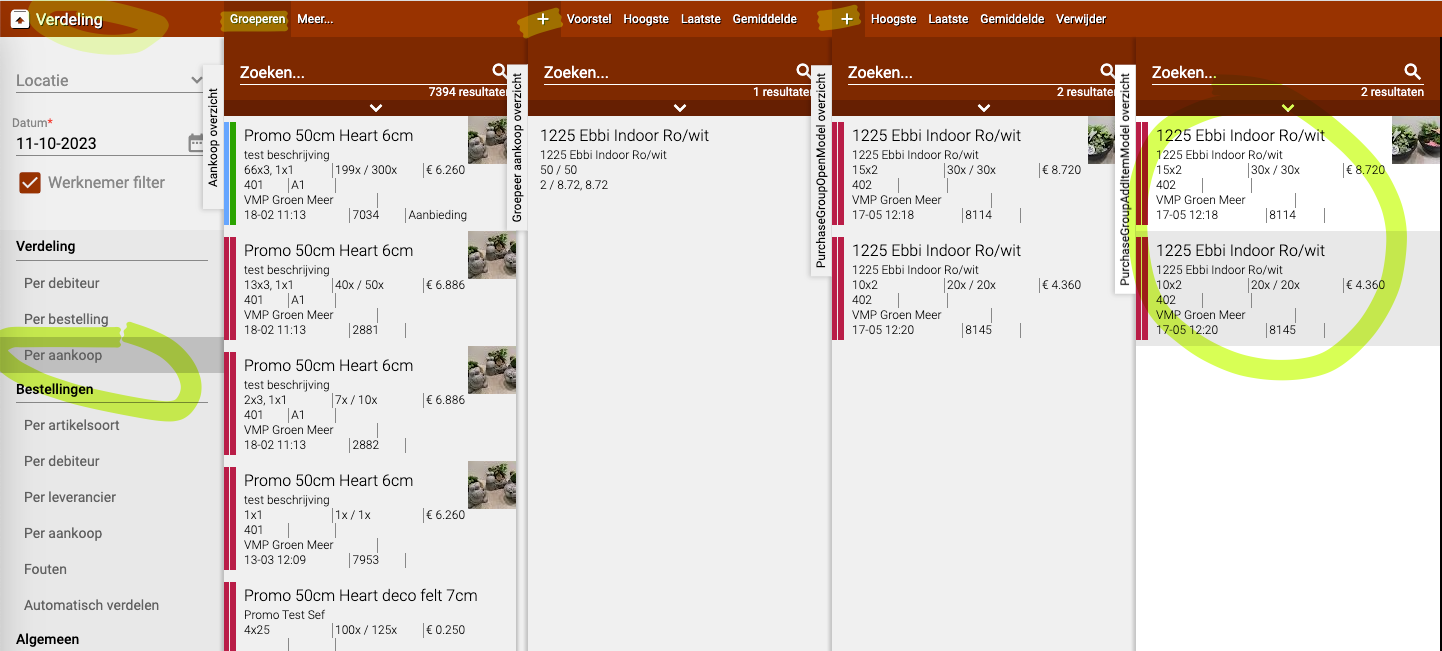
Step 3: Choose price
Now you must choose which price the merged batch gets. You have three options:
Option 1: Average
- The system calculates the average price of all selected batches
- Example: Batch A costs 1.00 euro, Batch B costs 1.20 euro, Batch C costs 0.80 euro
- Average price: (1.00 + 1.20 + 0.80) ÷ 3 = 1.00 euro
- When to use: This is usually the best choice for a fair price
Option 2: Highest
- The system chooses the highest price of all selected batches
- Example: Batch A costs 1.00 euro, Batch B costs 1.20 euro, Batch C costs 0.80 euro
- Highest price: 1.20 euro
- When to use: When you want to keep the highest margin
Option 3: Lowest
- The system chooses the lowest price of all selected batches
- Example: Batch A costs 1.00 euro, Batch B costs 1.20 euro, Batch C costs 0.80 euro
- Lowest price: 0.80 euro
- When to use: When you want to stay competitive or sell quickly
Make choice
- Click on the desired option (Average, Highest or Lowest)
- The system now starts merging
Step 4: Wait for recalculation
The merging takes a few seconds because the system has to recalculate all data.
What happens?
- The old batches are taken out of stock
- The system calculates the total quantity and the new price
- 1 new merged batch is created
- This new batch is placed in stock
During recalculation: The products temporarily disappear from your screen. This is normal! They'll come back in a moment.
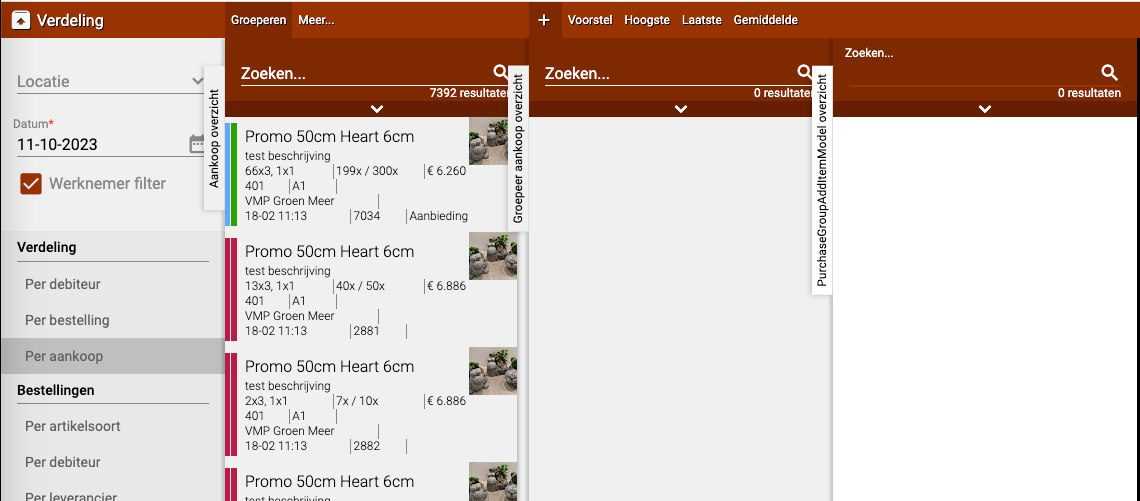
After calculation: The merged product reappears in your list as 1 new batch.
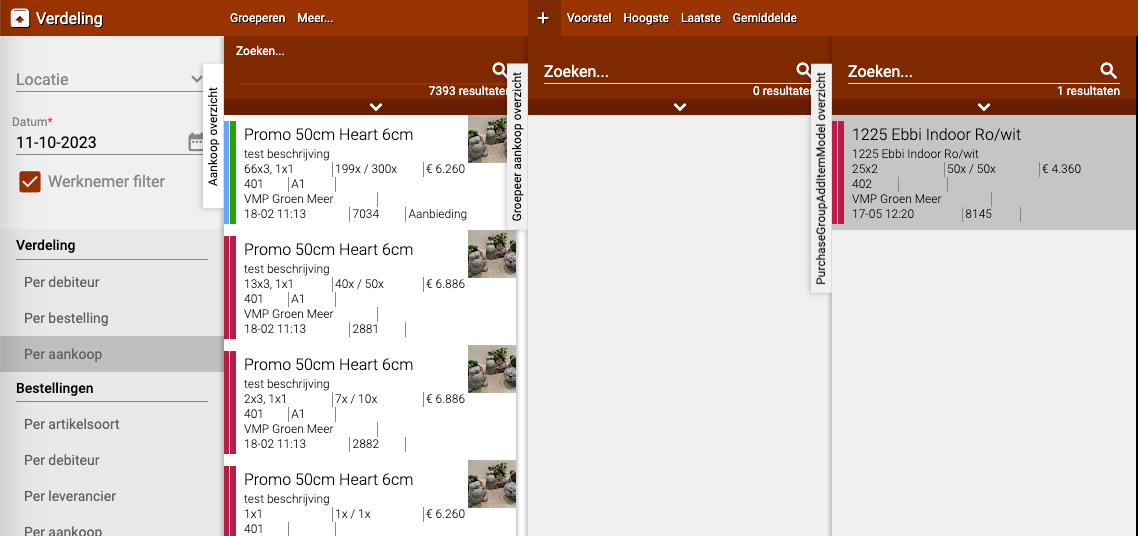
Step 5: Adjust name (optional)
If the name of the merged product isn't right, you can still adjust it.
Change name
- Go to "Per Purchase"
- Find the merged product in the list
- Select the product
- Click on the pencil (edit icon)
- Change the name to what you want
- Click on "Save"
Example: The system named the product "Rose red 60cm - mixed", but you just want to call it "Rose red 60cm".
Practical examples
Example 1: Merge three batches of roses
- Situation:
- Batch 1: 50 roses for 1.00 euro per piece
- Batch 2: 30 roses for 1.20 euro per piece
- Batch 3: 20 roses for 0.80 euro per piece
- Action:
- Go to Group
- Select all 3 batches of roses
- Choose "Average"
- Result: 1 batch of 100 roses for an average of 1.03 euro per piece
Example 2: Webshop with 1 product
- Situation: You have 5 different batches of tulips with different prices
- Problem: The webshop now shows 5 separate products, which is confusing for customers
- Action:
- Merge all 5 batches with "Average"
- Now there's 1 product "Tulips" on the webshop with 1 price
- Result: Clear webshop, customers see 1 clear product
Example 3: Clear out leftover batches
- Situation: You have 4 small leftover batches of lilies you want to get rid of
- Action:
- Merge them with "Lowest" price
- Put them on offer on the webshop
- Result: Attractive price, products sell faster
Example 4: Keep premium quality
- Situation: You have 2 batches of roses, of which 1 is very high quality (expensive)
- Action:
- Merge them with "Highest" price
- This way you keep the value of the premium batch
- Result: Good margin retained on quality product
Important tips
Tip 1: Only merge the same products
- Only merge batches of the same product
- Don't mix roses with tulips
- Don't mix 50cm roses with 70cm roses
- Do: merge 3 batches of "Rose red 60cm"
Tip 2: Check quality first
- If one batch has poor quality, don't merge it with good batches
- Otherwise you sell poor quality at too high a price
- Or good quality at too low a price
Tip 3: Choose the right price option
- Average: For a fair price (most used)
- Highest: When you want to keep good margin
- Lowest: When you want to sell quickly or be competitive
Tip 4: Wait for the recalculation
- The products temporarily disappear, this is normal
- Don't click multiple times or try again
- Be patient, it only takes a few seconds
Tip 5: Check the result
- Check after merging whether the price is correct
- Check whether the number of pieces is correct (sum of all batches)
- Adjust the name if necessary
Tip 6: Think about your stock
- Once merged you can't go back
- The separate batches no longer exist
- Are you sure you want to merge them? Then do it
Frequently asked questions
Question: Can I undo the merging?
- No, once merged it's final
- The original batches no longer exist
- So think carefully before merging
Question: Why do the products disappear during merging?
- The system is busy recalculating
- This is normal and only takes a moment
- They automatically come back as 1 new batch
Question: Can I merge more than 3 batches at once?
- Yes, you can merge as many batches as you want
- Select them all before choosing a price option
- The system merges them all into 1 batch
Question: What if the batches have different pot sizes?
- Don't merge them!
- 50cm and 70cm roses are different products
- Keep these separate in your stock
Question: Is the name automatically adjusted?
- Not always, sometimes it gets a generic name
- You can adjust the name yourself via "Per Purchase"
- Click on the pencil and change the name
Question: Which price do I see on the webshop?
- The price you chose (average, highest or lowest)
- Plus any markups you have set
- Customers then see 1 product with 1 price
What to do with problems?
Problem: Products don't come back after merging
- Wait another 30 seconds
- Refresh the page (F5 or refresh button)
- Check in "Per Purchase" whether the merged batch is there
Problem: Wrong products merged
- You can't undo it
- Solution: Split the batch by manually creating new batches
- Or: Leave it and be more careful from now on
Problem: Wrong price chosen
- Go to "Per Purchase"
- Select the product
- Click on the pencil
- Adjust the price manually
Problem: Can't select products
- Check whether you clicked the + sign twice
- Refresh the page and try again
- Check whether the location is set correctly
Summary
You merge batches to combine multiple separate purchases into 1 clear batch:
- Go to Distribution → Per purchase → Group
- Click twice on the + sign and select the products you want to merge
- Choose which price the merged product should get: Average (fairest price), Highest (best margin) or Lowest (sell quickly)
- Wait a few seconds while the system recalculates, products temporarily disappear but come back as 1 new batch
- Optionally adjust the name via Per Purchase → select product → pencil → change name
- Why useful: Easier to distribute, clear webshop with 1 product and 1 price, simpler stock
- Note: Merging is final and cannot be undone, only merge the same products
Do you have questions or need help? Feel free to contact us by phone at +31 (0)71 30 20 310 or send an email to support@easyflor.nl.