
Resending EKTs
Resending EKTs to customers
Introduction: What is resending an EKT?
An EKT (Electronic Clock Transaction) is a digital file that is automatically sent to customers with information about their purchases. Sometimes you need to send this file again, for example when a customer hasn't received it or there was an error. This is called "resending an EKT".
Why resend EKTs?
You want to resend an EKT because:
- The customer hasn't received the original EKT file
- There was an error in the first EKT file
- The customer accidentally deleted the file
- The EKT file got lost in email traffic
- The customer asks for a new copy for their administration
- There were technical problems with the first sending
Note: Resending EKTs only works if "Use EKTs" has been set up beforehand for this customer!
How do you resend an EKT?
Step 1: Go to Sales per debtor
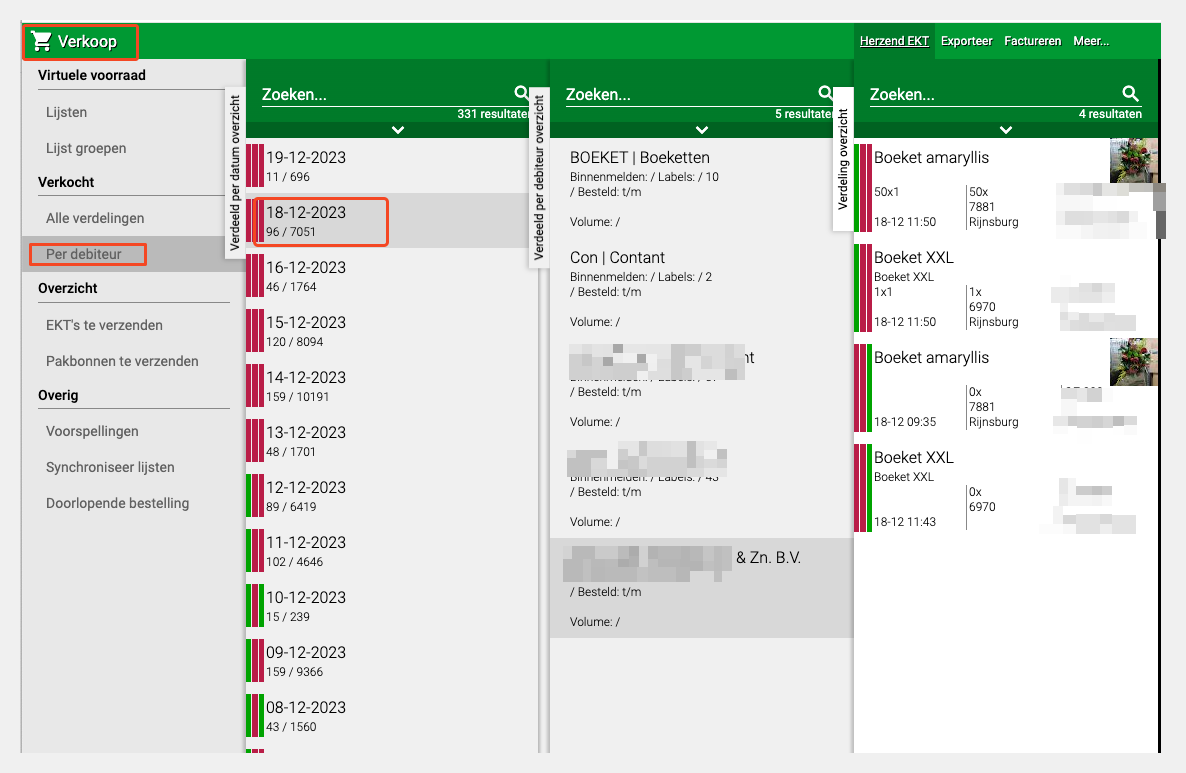
Open Sales tile
- Go to the "Sales" tile
- Click on "(Sold) Per debtor"
- You now see an overview of all sales per customer
Step 2: Select order day and customer
Choose order day
- Select the order day on which the sale took place
- This is the date when the customer bought the products
- For example: if the customer ordered on Monday, choose Monday
Select customer
- You now see a list of customers who bought on that day
- Find the customer for whom you want to resend the EKT
- Click on this customer
- The customer's overview opens
Step 3: Resend EKT
Use Resend EKT button
- If everything is set up correctly, you see the button "Resend EKT"
- Click on this button
- The EKT file is now resent to the customer
What happens now?
- The system creates a new EKT file
- This file is automatically sent to the customer
- The customer receives it via the configured method (email, system, etc.)
Done! The EKT has been resent.
What if the "Resend EKT" button is not visible?
If you don't see the button, this means "Use EKTs" is not set up for this customer.
Step 1: Check EKT setting
To customer configuration
- Go to "Organisation"
- Click on "Debtors"
- Find and select the customer
- Click on "Configuration"
Set up EKT
- Find the option "Use EKTs"
- Tick this option
- Click "Save"
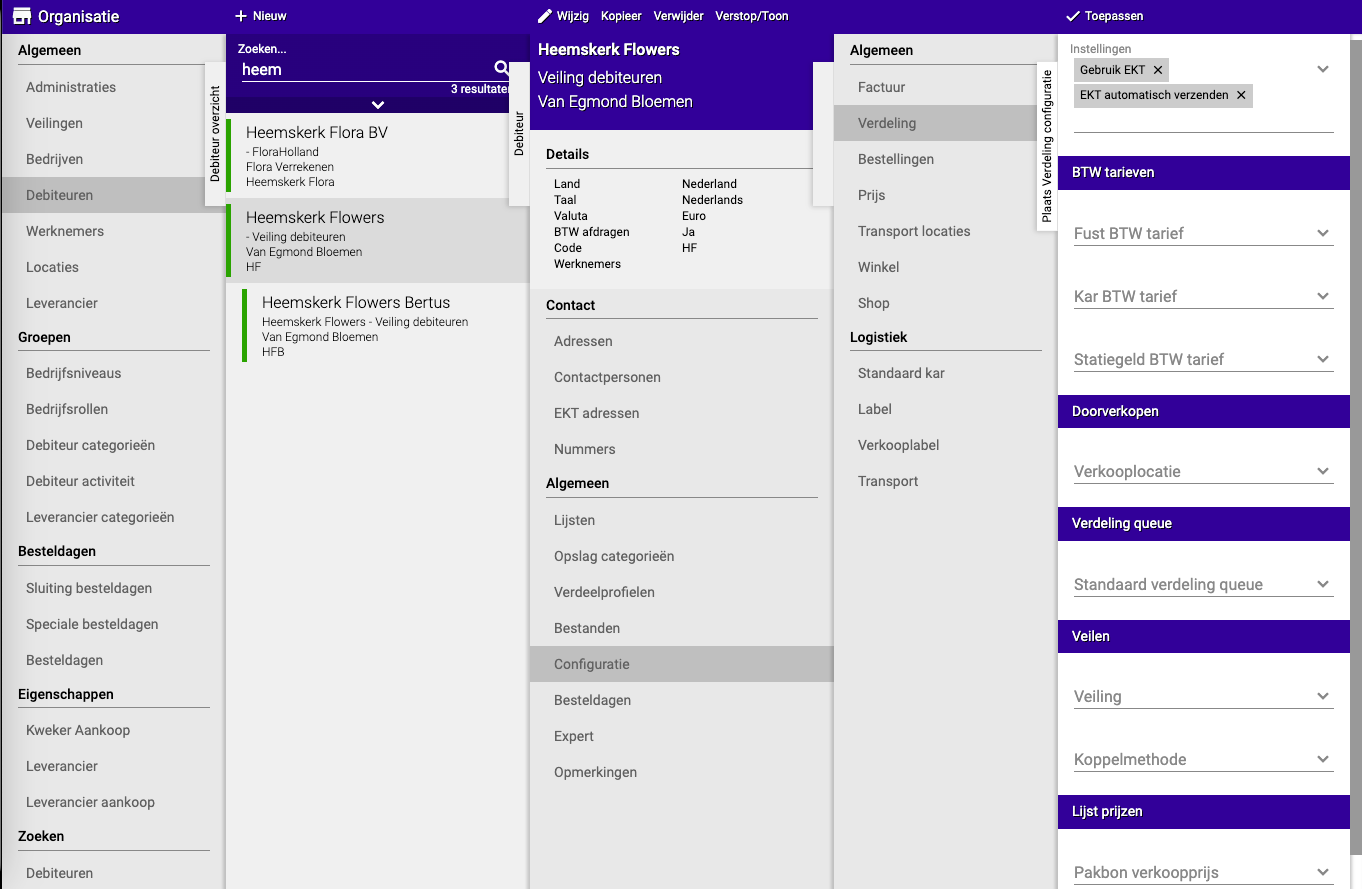
For more details: Consult the guide "Setting up and using debtor" and navigate to the "Configuration" chapter.
Step 2: Try again
After setting up "Use EKTs":
- Go back to Sales → Per debtor
- Select the customer again
- The "Resend EKT" button is now visible
- Click it to send the EKT
Practical examples
Example 1: Customer hasn't received EKT
- Situation: Customer Jansen calls saying he hasn't received the EKT file
- Action:
- Go to Sales → Per debtor
- Select the order day (e.g., yesterday)
- Click on Jansen
- Click "Resend EKT"
- Result: Jansen receives the EKT file again by email
Example 2: Error in first EKT
- Situation: You made a mistake in the distribution, corrected it, and now a new EKT must be sent
- Action:
- First correct the error in the distribution
- Go to Sales → Per debtor → select customer
- Click "Resend EKT"
- Result: Customer gets a correct EKT with the right data
Example 3: Button not visible
- Situation: You want to resend an EKT but the button is missing
- Problem: "Use EKTs" is not enabled
- Solution:
- Go to Organisation → Debtors → [Customer] → Configuration
- Tick "Use EKTs"
- Save
- Go back and try again
- Result: Button is now visible and EKT can be sent
Example 4: Administrative copy
- Situation: Customer asks for an extra copy for their administration
- Action:
- Find the original order day
- Select customer
- Resend EKT
- Result: Customer has a duplicate for their file
Important tips
Tip 1: First check whether "Use EKTs" is enabled
- Not all customers use EKTs
- Check this beforehand in the customer configuration
- This prevents confusion if the button doesn't appear
Tip 2: Check the order day
- Make sure you have selected the right date
- Otherwise you won't see the right sales
- Check with the customer which day it was
Tip 3: Verify with customer
- Ask the customer to confirm when the EKT has been received
- This way you know for sure it has arrived
- Also check whether it's the right file
Tip 4: Check email address
- If EKTs consistently don't arrive
- Check whether the customer's email address is correct
- It might be in spam or the address might be wrong
Tip 5: Document resends
- Note when you have resent an EKT
- This helps with troubleshooting
- And with customer questions later
Tip 6: Don't resend too often
- Only resend when really necessary
- Resending too much can cause confusion
- First check whether the original hasn't arrived after all
Frequently asked questions
Question: How do I know whether the EKT has arrived?
- Ask the customer for confirmation
- Check the sending logs if available
- Or ask the customer to check spam/junk folder
Question: Can I resend an EKT for an old date?
- Yes, that's possible
- Just select the right historical date
- And follow the normal steps
Question: What if "Use EKTs" cannot be enabled?
- Possibly EKT is not configured for your system
- Contact your administrator or support
- Or consult the extensive configuration guide
Question: Do I get a notification when the EKT has been sent?
- Usually yes, depending on your system settings
- The system usually gives a confirmation
- If in doubt: ask customer to check
Question: Can I send the EKT to another address?
- This depends on the configuration
- Usually it goes to the customer's default email address
- Adjust this in the customer data if it should structurally be different
Question: Is there a limit to how often I can resend?
- Technically not
- But do it in moderation to prevent confusion
- Usually one or two resends are enough
What to do with problems?
Problem: Resend EKT button not visible
- Check whether "Use EKTs" is enabled for this customer
- Go to Organisation → Debtors → [Customer] → Configuration
- Tick "Use EKTs" and save
Problem: EKT doesn't arrive at customer
- Check the customer's email address
- Ask customer to check spam/junk folder
- Check whether the email server is correctly configured
- Try resending again
Problem: Wrong order day selected
- Select the correct date
- Find the customer again
- Resend from the right day
Problem: Error message when resending
- Check whether all required fields are filled in
- Refresh the page and try again
- If it keeps failing: contact support
Problem: Customer receives old data
- Possibly the distribution wasn't updated
- First correct the distribution
- Then resend the EKT
Important requirements
Before resending EKTs works, the following must be set up:
For the customer:
- "Use EKTs" must be enabled in the configuration
- A valid email address (or other sending method)
- The customer must accept EKTs in their system
In the system:
- EKT functionality must be activated
- Sending method must be configured
- Correct templates must be set up
For the sale:
- There must be a distribution to send
- The distribution must be complete
- All required data must be filled in
Summary
You resend EKTs to send digital purchase files to customers again:
- Go to Sales → (Sold) Per debtor
- Select the order day of the sale and click on the customer
- Click the "Resend EKT" button to send the file again
- If button is not visible: "Use EKTs" is not enabled for this customer, set it up first via Organisation → Debtors → [Customer] → Configuration → tick "Use EKTs"
- Why resend: Customer hasn't received it, file was wrong, or customer asks for an extra copy
- Note: EKT functionality must be set up beforehand, both in the system and for the customer
Do you have questions or need help? Feel free to contact us by phone at +31 (0)71 30 20 310 or send an email to support@easyflor.nl.