
- Adding photos to articles
- Adjusting article names and sales units
- Automatically overwriting article names
- Charging trolleys
- Creating and organizing article groups
- Creating and using bouquets
- Creating and using label groups
- Creating sales barcodes
- Creating your own containers
- Importing FloraHolland container price list
- Using your own VBN codes
Importing FloraHolland container price list
Importing container prices from FloraHolland
Introduction: What are container prices?
Containers are the boxes, crates, buckets and trolleys in which flowers are transported. FloraHolland adjusts the prices for these packaging materials every few months. This concerns three things: deposit (security), container rental (rental price) and the regular price. You need to import these new prices into Easyflor so your system uses the correct amounts.
Why import container prices?
You need to import container prices to:
- Calculate the correct amounts for containers (packaging materials)
- Stay up-to-date with the official prices from FloraHolland
- Prevent charging customers too much or too little for containers
- Be able to calculate correct deposit (security)
- Charge the correct container rental
How do you import container prices?
Step 1: Download the price list document
- Go to the Royal FloraHolland website
- Type the following address in your browser:
- You now see the page with container information
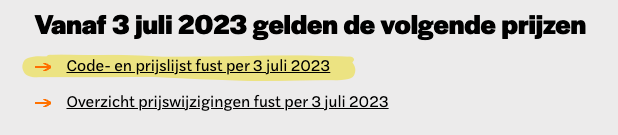
- Look for the newest "Code and price list containers per [Date]"
- Click on it to download the Excel file (.xlsx)
- The file is saved to your computer (usually in the "Downloads" folder)
Step 2: Import the document into Easyflor
Now we'll put the downloaded file into Easyflor:
- Open Easyflor
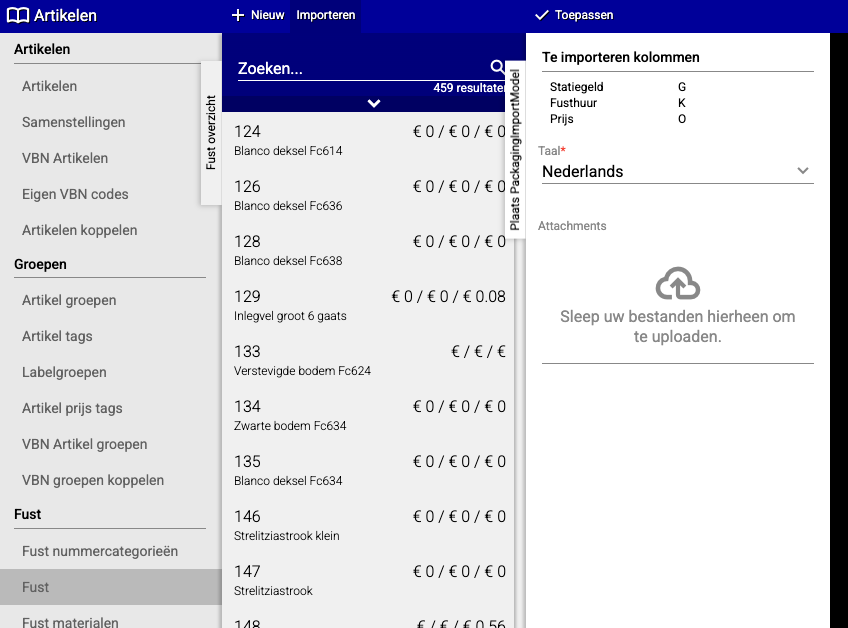
- Go to "Articles"
- Click on "Container"
- Click on "Import"
- Choose the language "Dutch"
- Click on the cloud icon (Attachments)
- Your computer now opens a window where you can choose files
- Go to the folder where you saved the Excel file (usually "Downloads")
- Select the file "Code and price list containers per [Date].xlsx"
- Click "Open"
- Click "Apply"
Step 3: Done!
The document is now imported. Easyflor now uses the new container prices from FloraHolland.
Tips
- Regularly check (e.g., every 3 months) if there are new container prices on the FloraHolland website
- Set a reminder in your calendar to update the prices
- Pay attention to the date in the filename, so you know which price list is the most recent
- Have you created containers with your own code? Those simply stay in place when you import. The import only affects the FloraHolland container lines and does not overwrite your own containers. See the article Creating your own containers.
Summary
Importing container prices is done in two simple steps:
- Download the newest price list from the FloraHolland website
- Import the Excel file into Easyflor via Articles → Container → Import
Do you have questions or need help? Feel free to contact us by phone at +31 (0)71 30 20 310 or send an email to support@easyflor.nl.