
- Alternative articles
- Choosing shopping cart behavior
- Giving a customer access to the webshop (complete flow)
- Managing front page - Adjusting and texts
- Managing front page - Creating and setting up
- Managing front page - Different blocks
- Sending mailings from the shop
- Using Mollie payments within Easyflor
- Webshop configuration settings
Choosing shopping cart behavior
Four options for customer behaviour after ordering
Introduction: What is shopping cart behaviour?
Shopping cart behaviour is what happens after a customer has confirmed an order on the webshop. You can choose where the customer is directed: does he stay in the shopping cart, go back to the homepage, or to a special thank you page? This determines the customer's experience after completing an order.
Why set up shopping cart behaviour?
You want to set up shopping cart behaviour because:
- You have control over what customers see after ordering
- You can thank customers with a special page
- You can redirect customers directly to new products
- It improves the customer experience and makes it more professional
- You can encourage customers to order more
- It is clear to the customer that the order was successful
What options are there?
You have four different options to choose from. Each option sends the customer to a different place after confirming the order.
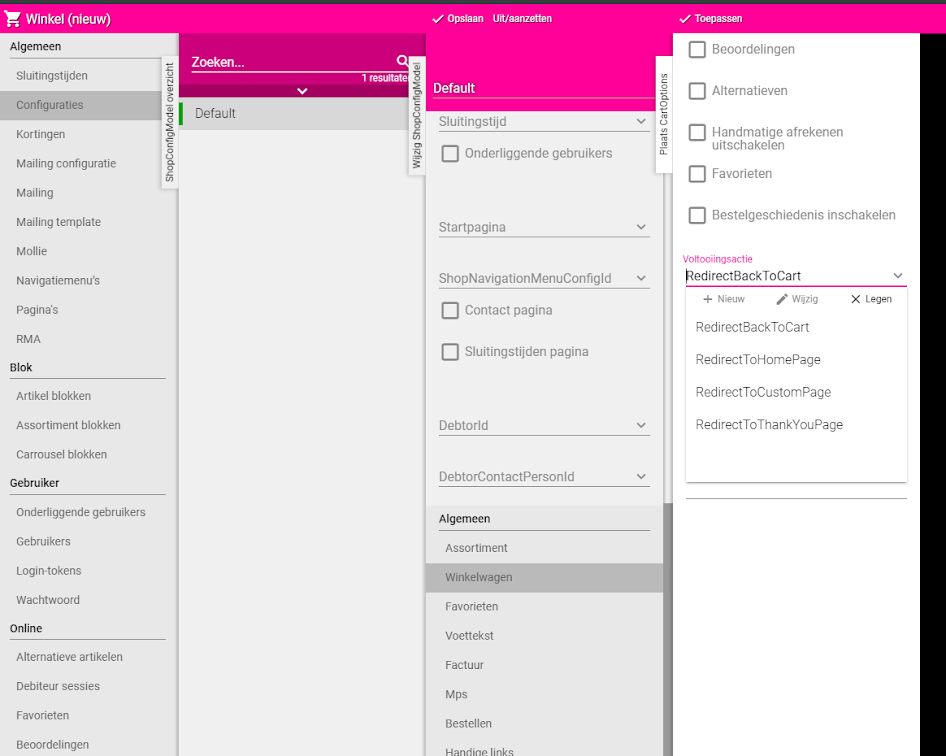
Option 1: RedirectBackToCart (Default)
What happens? After confirming the order, the customer stays in the shopping cart. He sees his empty shopping cart and can continue shopping immediately.
When to use?
- This is the default behaviour (most commonly used option)
- If you want customers to be able to continue ordering quickly
- For regular customers who often place multiple orders in a row
- If you want to keep it simple without extra pages
Advantages:
- Customer can continue shopping immediately
- No extra configuration needed
- Simple and fast
Disadvantages:
- No special confirmation that the order was successful
- Less personal
Option 2: RedirectToHomePage (To homepage)
What happens? After confirming, the customer is sent to the homepage. If no homepage is set, the customer goes back to the assortment (product overview).
When to use?
- If you want customers to see your newest products
- To send customers back to the beginning of the webshop
- If you have special offers on the homepage
- To inspire customers for a next order
Advantages:
- Customer immediately sees your newest products
- Clear and familiar for the customer
- Good for showing promotions
Disadvantages:
- Less clear confirmation of the order
- Customer has to go back to shopping cart himself if he wants to continue
Option 3: RedirectToCustomPage (To custom page)
What happens? After confirming, the customer is sent to a custom-made page. You can choose any page you have created in Easyflor.
When to use?
- If you have created a special page (for example "What happens now?")
- To give customers extra information about delivery
- To show a personal message
- If you want to inform customers about the ordering process
Advantages:
- You fully determine what the customer sees
- You can explain what the next steps are
- Professional and informative
- Good for building trust
Disadvantages:
- You must first create a page
- More configuration needed
- Must be maintained when information changes
Example custom page content:
- "Thank you for your order!"
- "We will get started for you right away"
- "You will receive a confirmation by email within 1 hour"
- "Delivery: tomorrow between 8:00 - 12:00"
Option 4: ToThankYouPage (To thank you page)
What happens? After confirming, the customer is sent to a standard thank you page. This page shows the text you entered in "Thank you text".
When to use?
- If you want a simple but personal confirmation
- To thank customers without creating an entire page
- For a professional closing of the order
- If you want to set something up quickly without much configuration
Advantages:
- Simple to set up (just fill in text)
- Personal confirmation for the customer
- Professional
- Clear that the order was successful
Disadvantages:
- Less flexible than a custom page
- Text only, no images or formatting
Example thank you text: "Thank you very much for your order! We will get started right away. You will receive a confirmation by email within an hour. If you have any questions, you can always call us on 012-3456789."
How do you set up shopping cart behaviour?
Step 1: Go to shop configuration
Open shop settings
- Go to the "Shop" tile
- Click on "Configuration"
- Find the section with shopping cart settings
Step 2: Choose behaviour
Select option
- Find the field for "Shopping cart behaviour" or "Redirect after order"
- Click on the dropdown menu
- You now see the four options:
- RedirectBackToCart
- RedirectToHomePage
- RedirectToCustomPage
- ToThankYouPage
- Choose the option you want to use
Step 3: Extra settings (if needed)
For RedirectToCustomPage:
- First choose the option "RedirectToCustomPage"
- A new field appears
- Select which page you want to use
- This page must have been created in Easyflor beforehand
For ToThankYouPage:
- Choose the option "ToThankYouPage"
- Find the field "Thank you text"
- Enter your thank you message here
- For example: "Thank you for your order! We will get started for you right away."
Step 4: Save and test
Save
- Click on "Save" or "Apply"
- The setting is now active
Test
- Go to your webshop
- Pretend you are a customer
- Add a product to the shopping cart
- Complete the order
- Check if you are sent to the correct page
Done! The shopping cart behaviour is now set up.
Practical examples
Example 1: Default setting for frequently ordering customers
- Situation: Your customers often order multiple times a day
- Choice: RedirectBackToCart
- Result: Customers stay in shopping cart and can continue ordering immediately
Example 2: New promotion on homepage
- Situation: You have a new collection you want to promote
- Choice: RedirectToHomePage
- Result: After ordering, customers immediately see the new collection
Example 3: Informative custom page
- Situation: You want to explain what happens after the order
- Choice: RedirectToCustomPage → Page "What happens now?"
- Result: Customers see clear explanation about delivery and next steps
Example 4: Simple thank you page
- Situation: You want to thank customers but don't have time for an entire page
- Choice: ToThankYouPage with text "Thank you! We deliver tomorrow between 8-12"
- Result: Customers see a friendly confirmation
Important tips
Tip 1: Test all options
- Try each behaviour before making a final choice
- Ask colleagues for feedback
- See what best fits your customers
Tip 2: Think about your customer type
- Regular business customers → RedirectBackToCart (continue ordering quickly)
- Private customers → ToThankYouPage (personal confirmation)
- New customers → RedirectToCustomPage (explanation and reassurance)
Tip 3: Write a good thank you text
- Keep it short and friendly
- Mention when they can expect something
- Provide contact information for questions
- Be clear and professional
Tip 4: Update the custom page regularly
- Check if the information is still correct
- Adjust delivery times when they change
- Keep contact details up to date
Tip 5: Combine with email confirmation
- Whichever option you choose, always send a confirmation email
- The page is only an initial confirmation
- Email is the official proof
Tip 6: Monitor customer behaviour
- Check if customers return to the shop
- Ask for feedback on the ordering procedure
- Adjust if it's not working well
Frequently asked questions
Question: Which option is best?
- Depends on your situation and customers
- For business customers: often RedirectBackToCart
- For private customers: often ToThankYouPage
- Test and choose what works best
Question: Can I have different behaviours for different customers?
- No, this is a general setting for all customers
- All customers get the same behaviour
- You can change it, but then for everyone
Question: Can customers still see their order?
- Yes, regardless of the choice
- They receive a confirmation email
- And can view their order history
Question: What if I haven't set a homepage?
- With RedirectToHomePage it then goes to the assortment
- This is the product overview page
- Works fine as well
Question: Do I need to fill in a thank you text first?
- For ToThankYouPage, yes
- Otherwise customers see an empty page
- Always fill this in before choosing this option
Question: Can I change this later?
- Yes, always
- Just go back to the configuration
- Choose a different option and save
What to do with problems?
Problem: Customers see an error message
- Check if all fields are filled in correctly
- For CustomPage: check if the page exists
- For ThankYouPage: check if thank you text is filled in
Problem: Customers end up on the wrong page
- Check which option is selected
- Test again as customer
- Save the configuration again
Problem: Thank you text is not shown
- Check if you have chosen ToThankYouPage
- Check if the text is entered correctly
- Refresh the webshop cache
Problem: Custom page not available
- First create the page in Easyflor
- Save the page
- Then go back to configuration to select it
Related guides
- Creating a shop user — To give customers access to the webshop
- Setting up order days — To determine when customers can order
- Creating and setting up a new customer (debtor) — To create a customer before setting up the webshop
Summary
Setting up shopping cart behaviour determines where customers go after confirming their order:
Four options:
- RedirectBackToCart (default): Customer stays in shopping cart, can continue ordering immediately
- RedirectToHomePage: Customer goes to homepage or assortment, sees new products
- RedirectToCustomPage: Customer goes to your custom-made page with your own content and explanation
- ToThankYouPage: Customer sees thank you page with your entered "Thank you text"
How to set up:
- Go to Shop → Configuration → find shopping cart behaviour
- Choose one of the four options
- For CustomPage: select which page (must already exist)
- For ThankYouPage: fill in "Thank you text" with confirmation message
- Save and test by placing a test order yourself
Making your choice:
- Business customers who order frequently → RedirectBackToCart
- Private customers → ToThankYouPage (personal and clear)
- For promotions/new products → RedirectToHomePage
- For extra information/explanation → RedirectToCustomPage
Do you have questions or need help? Feel free to contact us by phone at +31 (0)71 30 20 310 or send an email to support@easyflor.nl.