
- Adding payments
- Creating credit invoices
- Exporting Accounting and Checking for Errors
- Exporting IPAFFs for Shipments to the United Kingdom
- Exporting statistics overview (CBS and IDEV)
- Invoicing
- Making a copy of administration
- Modifying Existing RMAs
- Offsetting Payments and Credit Invoices
- Reversing payments / Making an invoice unpaid
- SEPA: What do the error codes mean?
- Setting up UBL
Exporting statistics overview (CBS and IDEV)
Exporting and submitting CBS and IDEV statistics
Introduction: What are CBS and IDEV statistics?
CBS and IDEV statistics are official reports about your trade that you must submit to government agencies. CBS (Central Bureau of Statistics) is for the Netherlands, and IDEV is for Germany. These reports contain information about your sales and purchases, especially when trading with other countries. Easyflor can automatically generate these reports for you.
Why submit CBS and IDEV statistics?
You must submit these statistics because:
- It is legally required for companies trading with other EU countries
- Governments use this data for economic statistics
- You can receive fines for not submitting
- It is important for customs and tax returns
- You fulfill your administrative obligations
- The government gains insight into import and export figures
Two types:
- CBS: For Dutch companies (submit to CBS)
- IDEV: For companies trading in Germany (submit to the IDEV portal)
How do you create CBS and IDEV statistics?
This is done in two parts: first creating the file in Easyflor, then submitting it to the government.
Part 1: Creating the statistics file in Easyflor
Step 1: Go to the CBS/IDEV menu
Open the Invoices tile
- Go to the "Invoices" tile
- Click on "(Other) CBS"
- You are now in the export screen
Step 2: Set filters
Here you choose which data should be included in the report.
1. Select the administration
- Choose the correct administration
- If you have multiple companies, select the right one
- For example: "German BV" for IDEV, "Dutch BV" for CBS
2. Fill in country group (optional)
- Enter a country group if applicable
- For example: only trade with Germany, or only with Belgium
- Leave empty for all countries
3. Choose file name (optional)
- Give the file a recognizable name
- For example: "CBS_january_2025.xlsx" or "IDEV_Q1_2025.csv"
- This helps when finding files later
4. Select time period (IMPORTANT)
- Choose the period you want to report on
- Date from: Start date (for example January 1, 2025)
- Date to: End date (for example January 31, 2025)
- You usually report monthly or quarterly
5. Select Extended
- Check "Extended"
- This provides more detailed information
- Usually required for correct reporting
Step 3A: Download CBS file (for the Netherlands)
Create CBS export
- Check that all filters are set correctly
- Click the "CBS" button at the top
- The Excel file download starts automatically
- The file is downloaded to your computer (usually to your Downloads folder)
What can you do with this file?
- This is the official CBS file
- You can upload it on the CBS website
- Or send it to your administrator/accountant
- The file already contains all your trade data in the correct format
Step 3B: Download IDEV file (for Germany)
Create IDEV export
- Check that all filters are set correctly
- Click the "IDEV" button at the top (not CBS!)
- A CSV file is downloaded
- This file is specifically for the German IDEV system
Difference between CBS and IDEV:
- CBS: Excel file (.xlsx) for the Netherlands
- IDEV: CSV file (.csv) for Germany
- Use the correct button for the correct country!
Done with Easyflor! You now have the file to submit.
Part 2: Submitting the IDEV file on the German portal
Now we go step by step through the IDEV portal to submit the file.
Note: This part is specific to IDEV (Germany). For CBS (Netherlands), follow the instructions on the CBS website.
Step 1: Log in to the IDEV portal
Go to the website
- Go to the IDEV portal (you receive the website from the German government)
- Log in with your username and password
- You arrive at the start screen
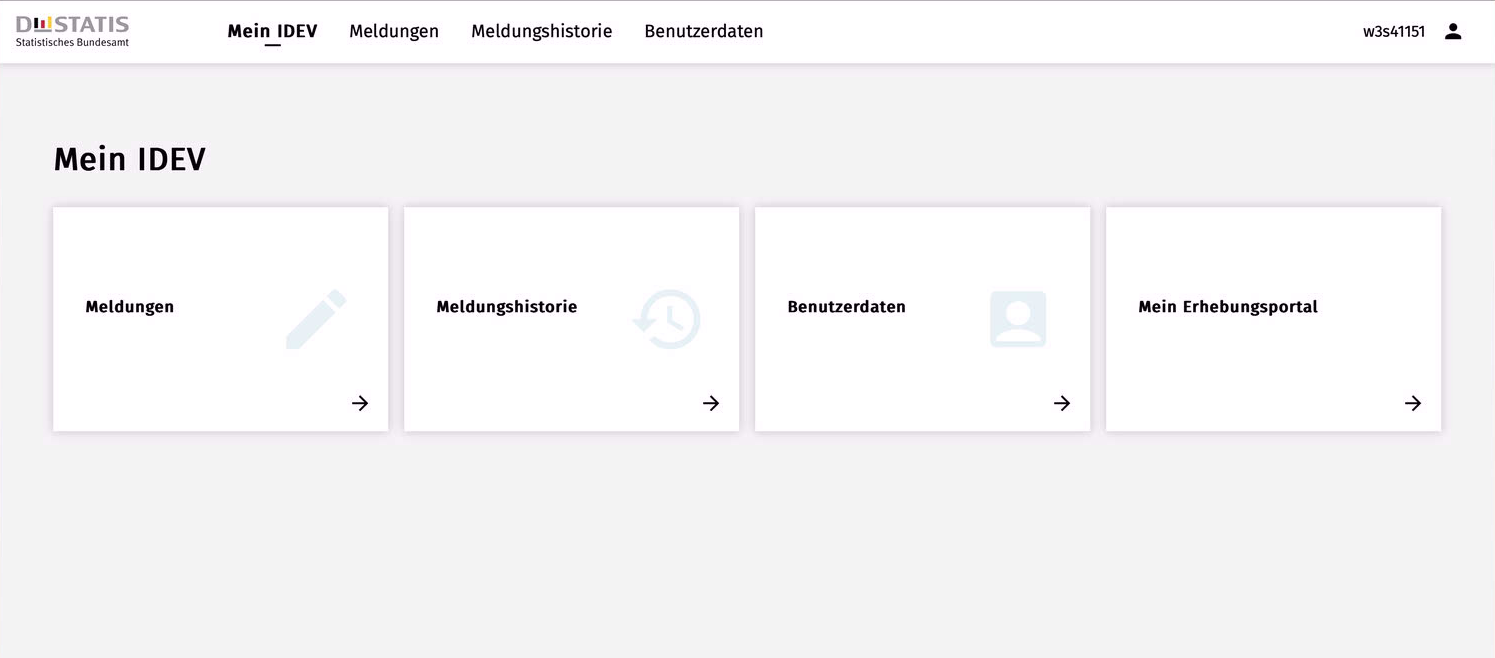
Step 2: Select Meldungsabgabe
Go to the submission menu
- Click on "Meldungsabgabe" (this means "submit report" in German)
- A new screen opens with options
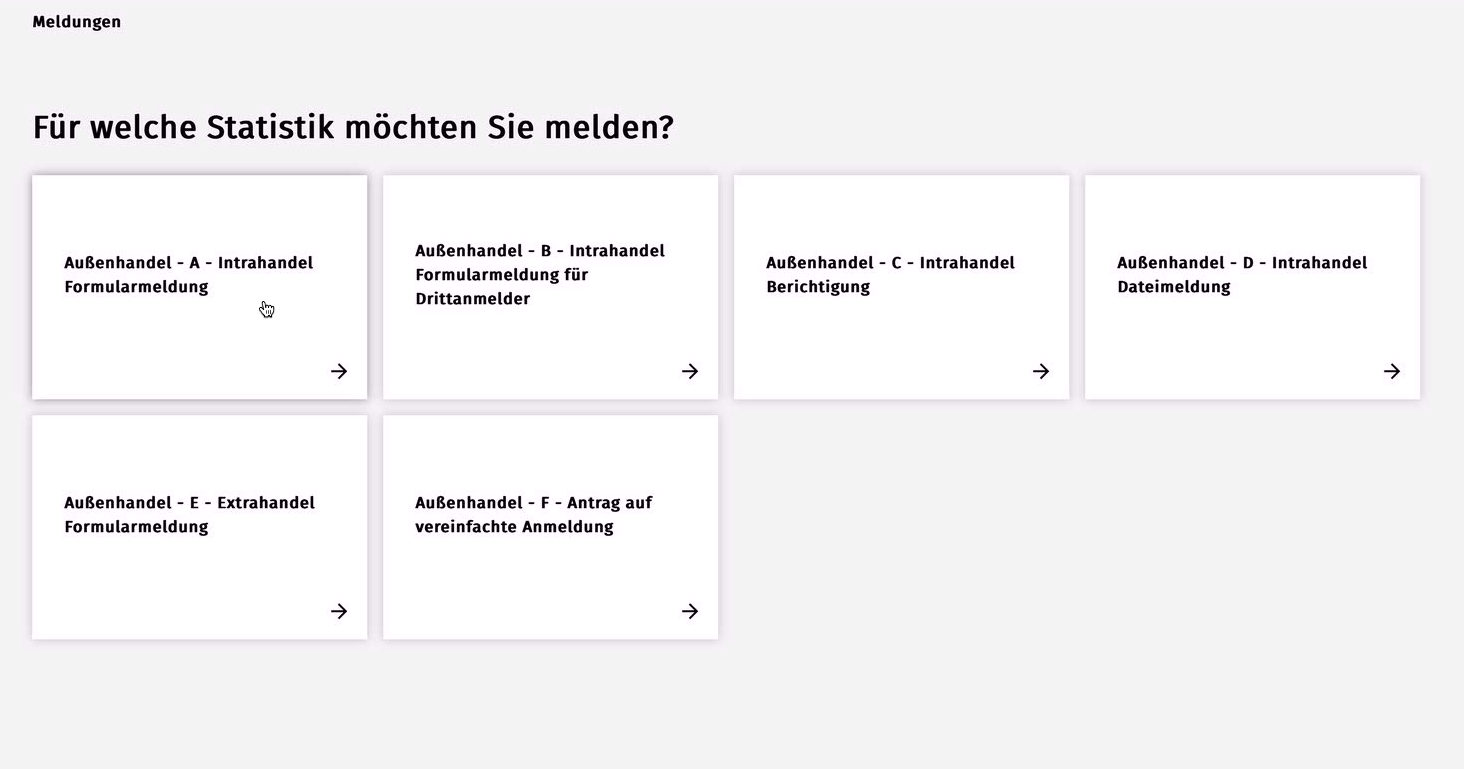
Step 3: Choose Außenhandel
Select submission type
- Click on "Außenhandel - A - Intrahandel Formularmeldung"
- This is the option for intra-EU trade (trade within Europe)
- A new screen opens with years
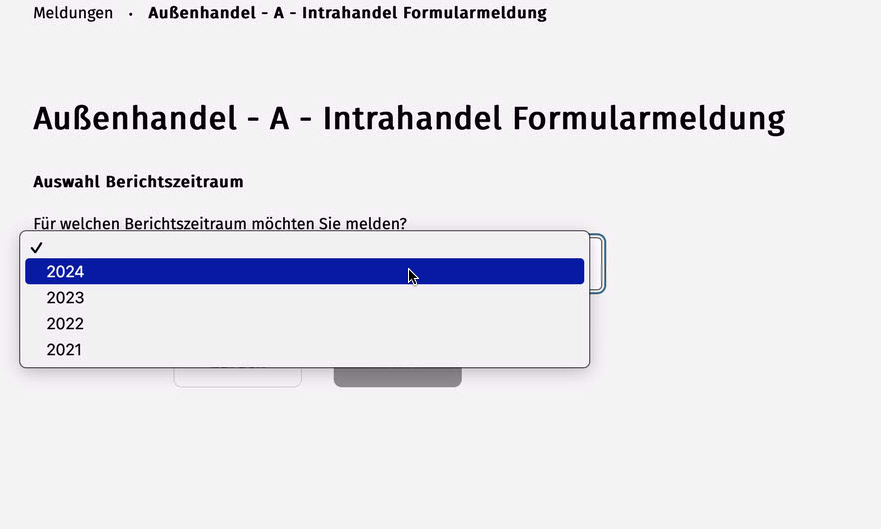
Step 4: Select the year
Choose the correct year
- Click on the current year
- In the example: 2024
- Click on the year you want to report for
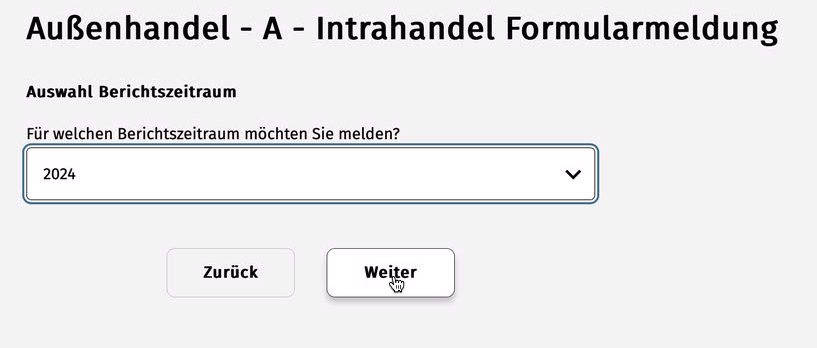
Continue
- Click at the bottom on "Weiter" (this means "Next" in German)
- You go to the next screen
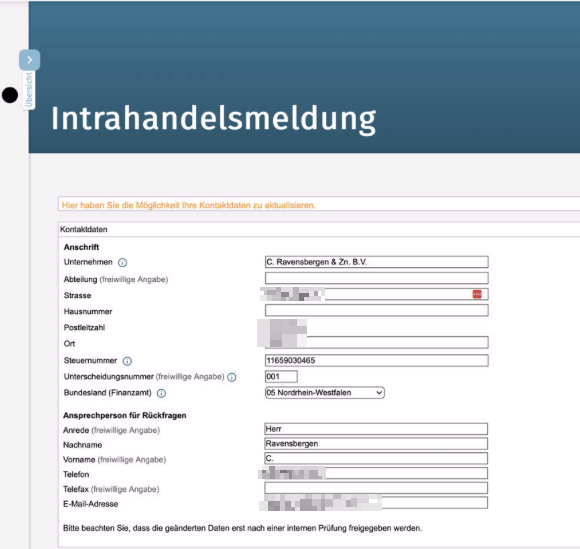
Step 5: Check data
Verification screen
- Check if all displayed data is correct
- Check:
- Your company name
- Your address
- The correct year
- The correct period (month/quarter)
- Everything correct? Click "Weiter"
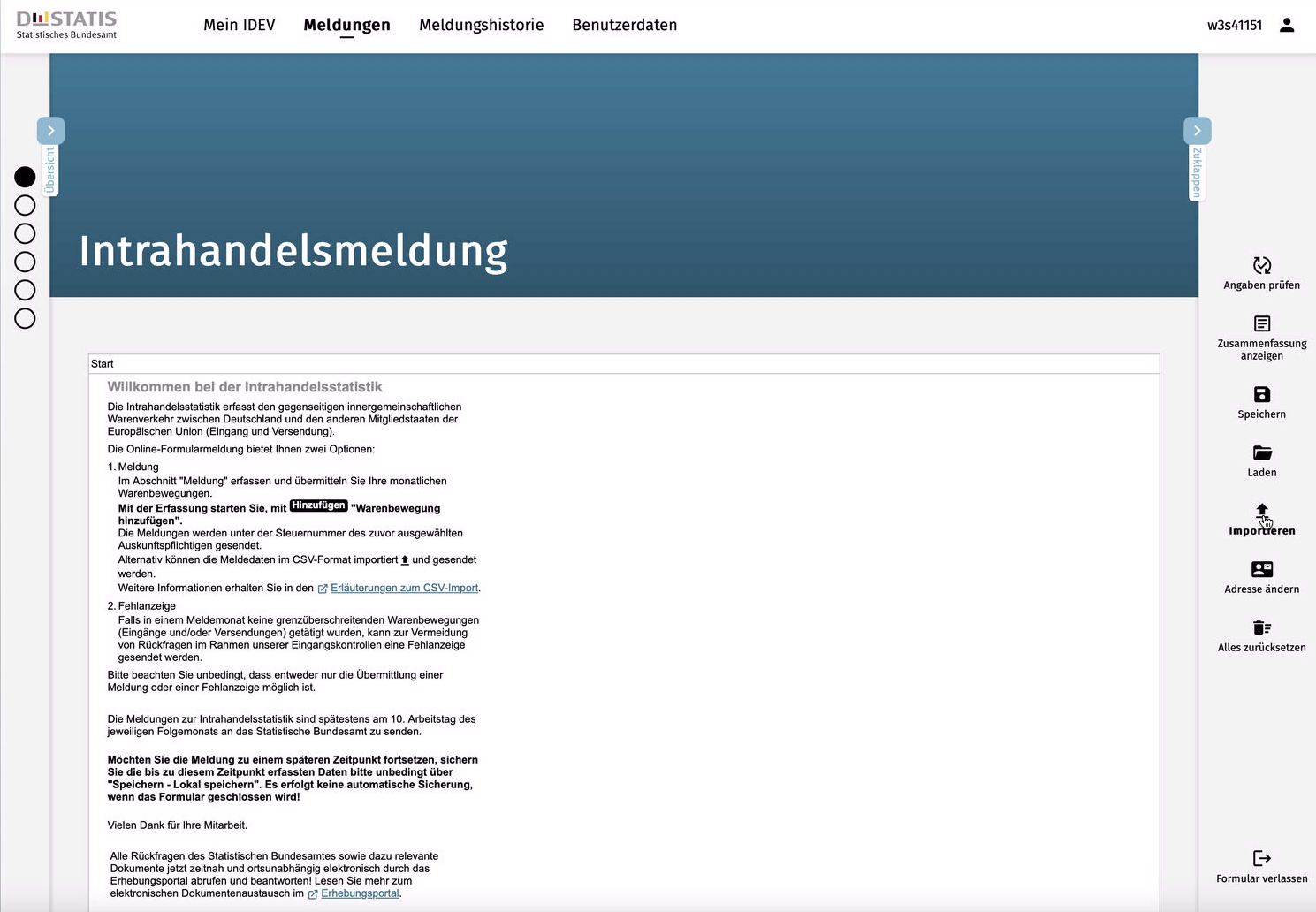
Step 6: Select Import
Go to the upload function
- You arrive at the start screen of the submission
- On the right you see various options
- Click on "Importieren" (this means "Import")
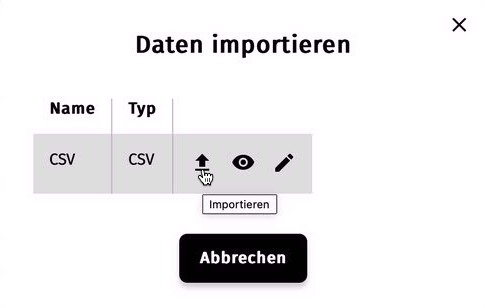
Step 7: Open import function
Popup window
- A popup window appears
- Click again on the "Importieren" arrow pointing up
- This is the first button with the upload icon
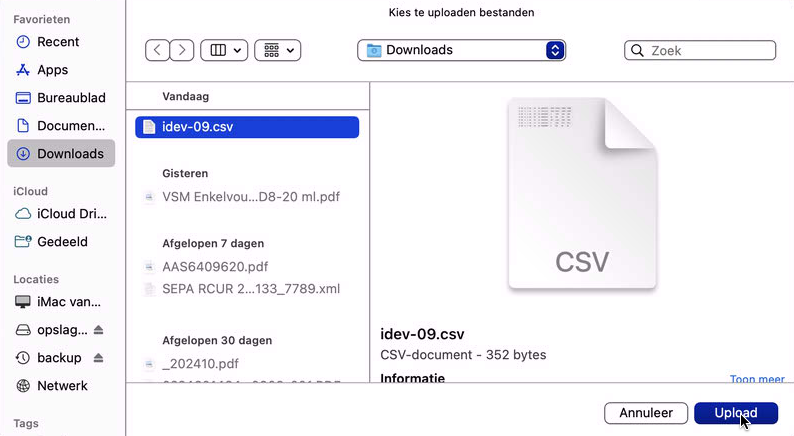
Step 8: Select file
Navigate to your file
- Click on the folder icon to choose your file
- What happens next depends on your computer:
- Apple/Mac: Apple Finder opens
- Windows: Windows Explorer opens
- Navigate to where you saved the IDEV file (usually Downloads)
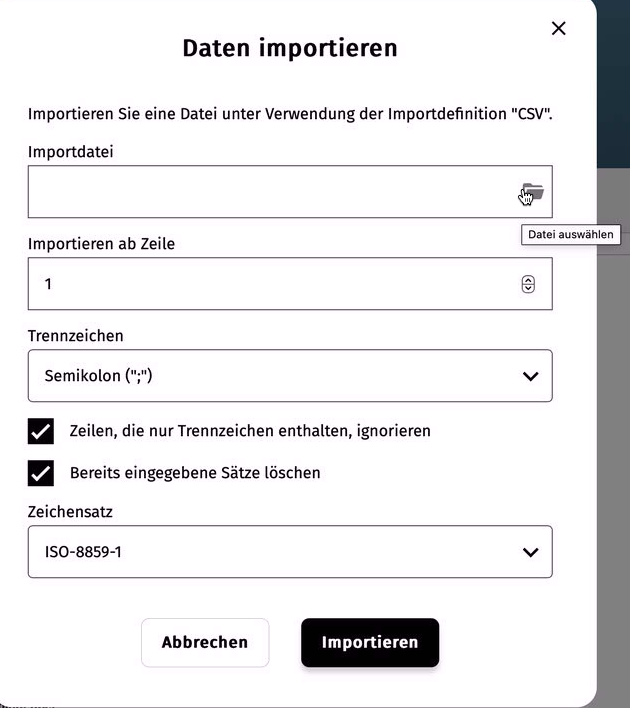
Step 9: Upload file
Choose and upload file
- Find the IDEV CSV file that you downloaded in part 1
- Select the file
- Click "Upload" or "Open"
- The file is now being uploaded to the IDEV system
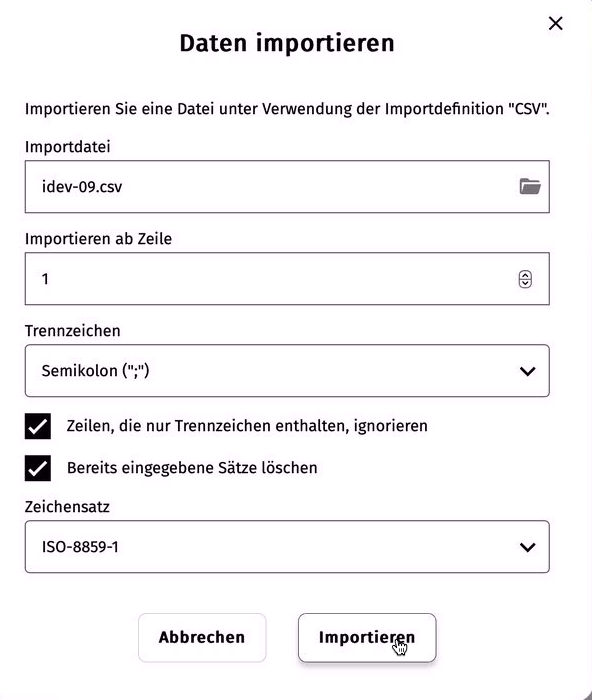
Step 10: Confirm import
Finalize import
- After uploading you see the file on screen
- Click "Importieren" to definitively submit
- The system now processes your data
Done! Your IDEV statistics have been submitted to the German government.
Practical examples
Example 1: Monthly CBS reporting
- Situation: You must submit CBS figures every month
- Action:
- Beginning of the month: Invoices → CBS
- Administration: Dutch BV
- Date from: January 1, Date to: January 31
- Extended: On
- Click CBS → Download Excel
- Upload on CBS website
- Result: Monthly submission completed
Example 2: Quarterly IDEV reporting
- Situation: You must submit IDEV figures quarterly for German trade
- Action:
- End of Q1: Invoices → CBS
- Administration: German BV
- Date from: Jan 1, Date to: Mar 31 (entire Q1)
- Extended: On
- Click IDEV → Download CSV
- Follow IDEV portal steps 1-10
- Result: Quarterly submission completed
Important tips
Tip 1: Schedule fixed moments
- For example: First working day of the month you do CBS/IDEV
- Set it as a recurring task in your calendar
Tip 2: Save the files
- Save each downloaded file with a clear name
- For example: "CBS_jan_2025.xlsx" or "IDEV_Q1_2025.csv"
- Create a folder per year
Tip 3: Check before submitting
- Open the file in Excel/text editor
- Check if the figures make sense
Tip 4: Use the correct button
- CBS = Excel file for the Netherlands
- IDEV = CSV file for Germany
- Use the correct button for the correct country!
Tip 5: Remember the deadline
- Check when you need to submit (usually beginning of the month)
- Late submission can result in fines
Summary
Creating and submitting CBS and IDEV statistics is done in two parts:
Part 1 - Creating the file in Easyflor:
- Go to Invoices → (Other) CBS
- Set filters: administration, country group (optional), file name (optional), time period (date from/to), check "Extended"
- For the Netherlands: Click CBS → Excel file downloads
- For Germany: Click IDEV → CSV file downloads
Part 2 - Submitting the IDEV file (Germany only):
- Log in to the IDEV portal
- Click Meldungsabgabe
- Click Außenhandel - A - Intrahandel Formularmeldung
- Select the correct year → Weiter
- Check data → Weiter
- Click Importieren (right side menu)
- Click the Importieren arrow (in popup)
- Click folder icon → select IDEV CSV file
- Click Upload
- Click Importieren to definitively submit
Why important:
- Legally required for trade with other EU countries
- Government uses this for economic statistics
- Not submitting can result in fines
Remember: CBS = Excel for Netherlands, IDEV = CSV for Germany — use the correct button!
Do you have questions or need help? Feel free to contact us by phone at +31 (0)71 30 20 310 or send an email to support@easyflor.nl.