
- (VIDEO) Creating administration and location
- (VIDEO) Creating debtors
- (VIDEO) Creating shop users
- Assigning Seat and Place Numbers (Via EKT)
- Automatic redistribution from location to location to debtor upon sale
- Creating a Shop User (Webshop)
- Creating and setting up a new customer (debtor)
- Creating contact persons
- Creating Sub Shop Users
- Creating VMP for debtors
- How to Create a Purchase Debtor in Easyflor
- Link Debtors to Employees
- Order Days
- Setting up administration and location
- Setting up cancellation time
- Setting Up Invoice Numbers
Assigning Seat and Place Numbers (Via EKT)
How do you set up seat and place numbers for EKT messages in Easyflor?
What are seat and place numbers?
Seat and place numbers are unique numbers you can assign to different buyers of one customer. If a customer has multiple people who purchase, each buyer gets their own number. This way you always know who ordered what via EKT (Electronic Clock Transaction).
Why use seat and place numbers?
The problem:
- A customer has multiple buyers (for example Buyer A, B and C)
- All buyers order through the same company
- You want to know which buyer placed which order
- EKT messages need to go to the right person
The solution:
- Each buyer gets their own unique seat and/or place number
- In the EKT messages you can immediately see who the buyer is
- You can automatically distribute orders to the right person
- Everything stays organized
Practical example:
COMPANY: Flower Trade The Rose
    ↓
BUYER A → Seat number 3001
BUYER B → Seat number 3002
BUYER C → Seat number 3003
Now you can see:
- Order with number 3001 = from Buyer A
- Order with number 3002 = from Buyer B
- Order with number 3003 = from Buyer C
What is the difference between seat and place number?
Seat number:
- A unique number for a buyer within a company
- For example: 3001, 3002, 3003
Place number:
- Also a unique number for a buyer
- Works the same as a seat number
- Which number you use depends on your supplier
Important: Each supplier works differently! Some use seat numbers, others place numbers, and some use both. Always check with your supplier!
Which numbers should you use?
General guidelines:
Usually you start with these numbers:
- 1000 series: For internal place numbers (for yourself)
- For example: 1001, 1002, 1003
- 3000 series: For customer place numbers
- For example: 3001, 3002, 3003
Note: These are guidelines! Always check with your supplier which numbers to use.
Numbers must match!
The numbers in Easyflor must be exactly the same as the numbers at your supplier!
Example:
AT YOUR SUPPLIER:
Buyer A = Place number 3001

IN EASYFLOR:
Buyer A = Place number 3001 (exactly the same!)
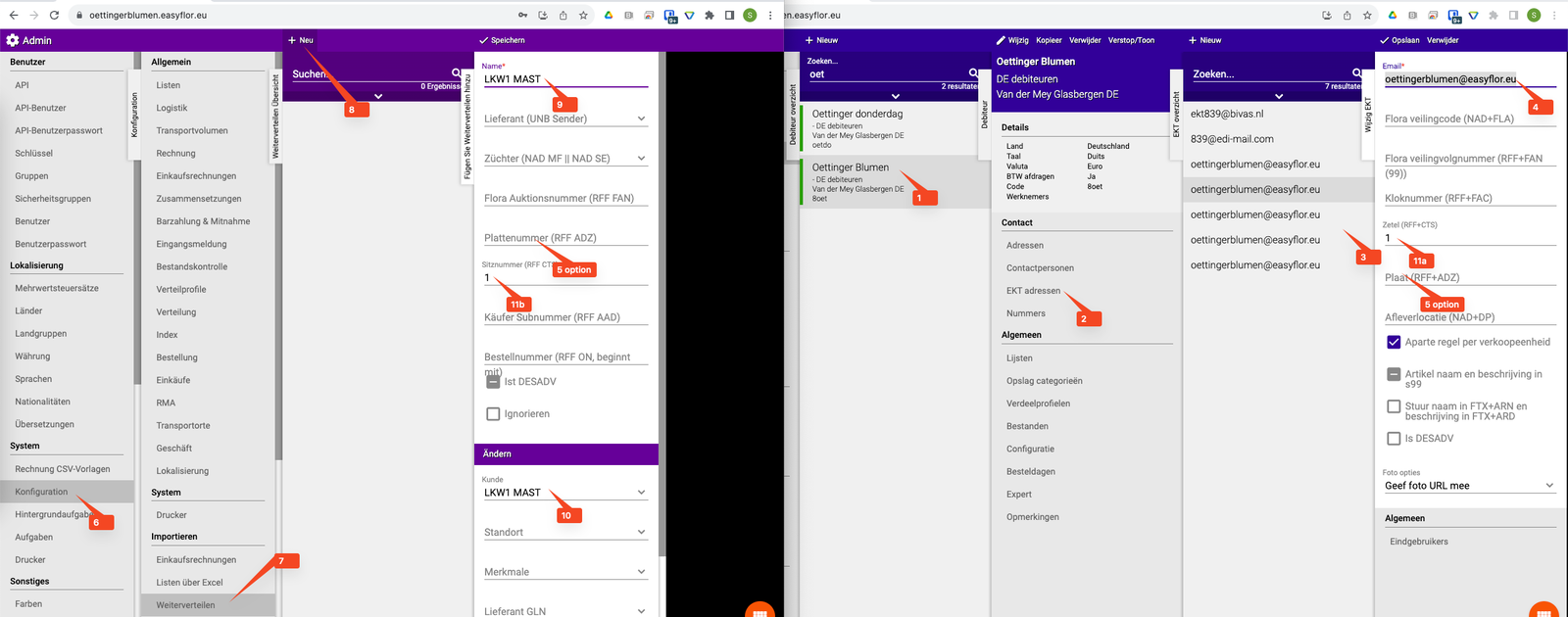
FloraHolland:
At FloraHolland you can find a lot of information about seat and place numbers through their portal. Check there which numbers you should use!
How do you set up seat and place numbers?
Step 1: Go to the debtor
- Click on "Organisation"
- Click on "Debtors"
- Select the customer (debtor) that has multiple buyers
Step 2: Go to EKT addresses
- Click on "EKT addresses"
- Select the contact person (buyer) for whom you want to set a number
Step 3: Fill in the EKT email address
- For Easyflor customers this is always: <customer environment name>@easyflor.eu
Example:
- If the customer environment is called "flowertradetherose"
- Then the EKT email address is: flowertradetherose@easyflor.eu
Step 4: Fill in the seat and/or place number
- Fill in a unique Seat number (for example: 3001)
- And/or fill in a unique Place number (for example: 3001)
- Use numbers as your supplier indicates
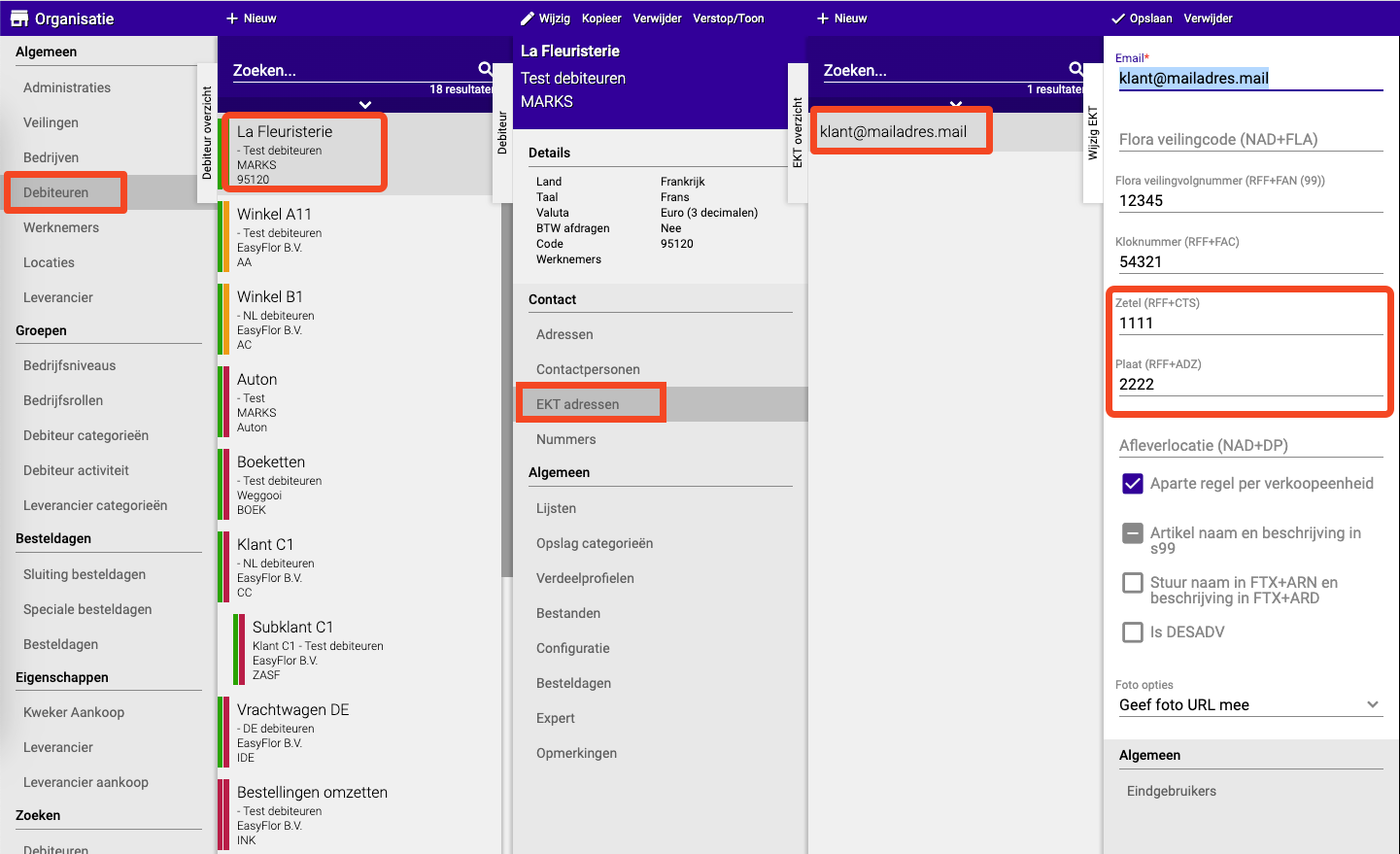
Step 5: Repeat for each buyer
- Go back to "EKT addresses"
- Select the next contact person (buyer)
- Fill in the same EKT email address
- Fill in a new unique seat/place number (for example: 3002)
- Repeat until all buyers have their own number
Important: Always use the same EKT email address for all buyers of one customer!
Setting up automatic distribution
What is distribution?
After you have set up seat and place numbers, you need to enable distribution on the receiver side (at the customer). This way orders are automatically sent to the right buyer.
How do you do this?
See the separate guide: Setting up automatic distribution
Complete example
Situation:
Flower Trade The Rose has 3 buyers:
- Buyer Jan
- Buyer Marie
- Buyer Piet
Step 1: Check with your supplier
- Ask which numbers you should use
- Supplier says: use 3001, 3002, 3003
Step 2: Set up for Buyer Jan
- Go to Organisation → Debtors → "Flower Trade The Rose"
- Click on EKT addresses → Select contact person "Jan"
- EKT email address: flowertradetherose@easyflor.eu
- Seat number: 3001
- Save
Step 3: Set up for Buyer Marie
- Go to EKT addresses → Select contact person "Marie"
- EKT email address: flowertradetherose@easyflor.eu (the same!)
- Seat number: 3002
- Save
Step 4: Set up for Buyer Piet
- Go to EKT addresses → Select contact person "Piet"
- EKT email address: flowertradetherose@easyflor.eu (the same!)
- Seat number: 3003
- Save
Result:
Jan orders   → EKT with number 3001 → Automatically to Jan
Marie orders → EKT with number 3002 → Automatically to Marie
Piet orders  → EKT with number 3003 → Automatically to Piet
Important tips
Tip 1: Always check with your supplier
- Each supplier works differently
- Ask which numbers you should use
- Ask whether you need seat or place numbers (or both)
Tip 2: Use consistent numbering
- Choose a system and stick to it
- For example: 3001, 3002, 3003, 3004, etc.
- Not mixed up: 3001, 3005, 3012, 3002
Tip 3: Same EKT email address
- All buyers of one customer use the same EKT email address
- Only the seat/place number is different
Tip 4: Write down the numbers!
- Note which buyer has which number
- This way you don't lose track
- For example in an Excel file or note
Tip 5: Test it!
- Have a buyer place a test order
- Check if the EKT message has the correct numbers
- This way you know for sure everything works
Tip 6: FloraHolland portal
- Working with FloraHolland? Check their portal
- You'll find lots of information about seat and place numbers there
- You can also create and manage numbers there
Common mistakes
Mistake 1: Numbers don't match
- Easyflor says: 3001
- Supplier says: 3005
- Result: EKT messages don't arrive!
- Solution: Make sure the numbers are exactly the same
Mistake 2: Used different EKT email addresses
- Buyer A: mailaddress1@easyflor.eu
- Buyer B: mailaddress2@easyflor.eu
- Result: Confusion and messages don't arrive
- Solution: Always use the same email address per customer
Mistake 3: Forgot to fill in numbers
- Contact person created, but no number filled in
- Result: No unique identification possible
- Solution: Always check if the number is filled in
Mistake 4: Distribution not enabled
- Numbers are set, but distribution is off
- Result: Orders don't automatically go to the right buyer
- Solution: Enable distribution at the receiver
Summary: Quick checklist
Preparation:
- Check with your supplier which numbers to use
- Check if you need seat, place, or both numbers
- Make a list of all buyers who need a number
Set up per buyer:
- Organisation → Debtors → Select customer
- EKT addresses → Select contact person (buyer)
- Fill in EKT email address: <customer environment name>@easyflor.eu
- Fill in unique Seat number and/or Place number
- Save
- Repeat for each buyer (always use the same EKT email address!)
After setting up:
- Enable distribution at the receiver (see separate guide)
- Test with a trial order
- Check if EKT messages have the correct numbers
- Note which buyer has which number
Now each buyer can place their own orders with a unique number! 📋
Do you have questions or need help? Feel free to contact us by phone at +31 (0)71 30 20 310 or send an email to support@easyflor.nl.